The gap nobody talked about
Azure has supported IPv6 in virtual networks for years. You can build a dual-stack VNet, attach dual-stack NICs to VMs, front them with a Standard Load Balancer that has an IPv6 frontend, peer dual-stack VNets, and write IPv6 NSG rules. All of that has been generally available for a long time.
But there was always a wall at the end of that road: the moment your IPv6 client wanted to talk to a PaaS service privately, you were back on IPv4. Private Endpoints were IPv4-only. So every "IPv6-first" design in Azure ended the same way — dual-stack up to the application tier, then a translation layer, a proxy, or a quiet architectural exception so that Storage, SQL, and Key Vault traffic could ride IPv4 to a private endpoint.
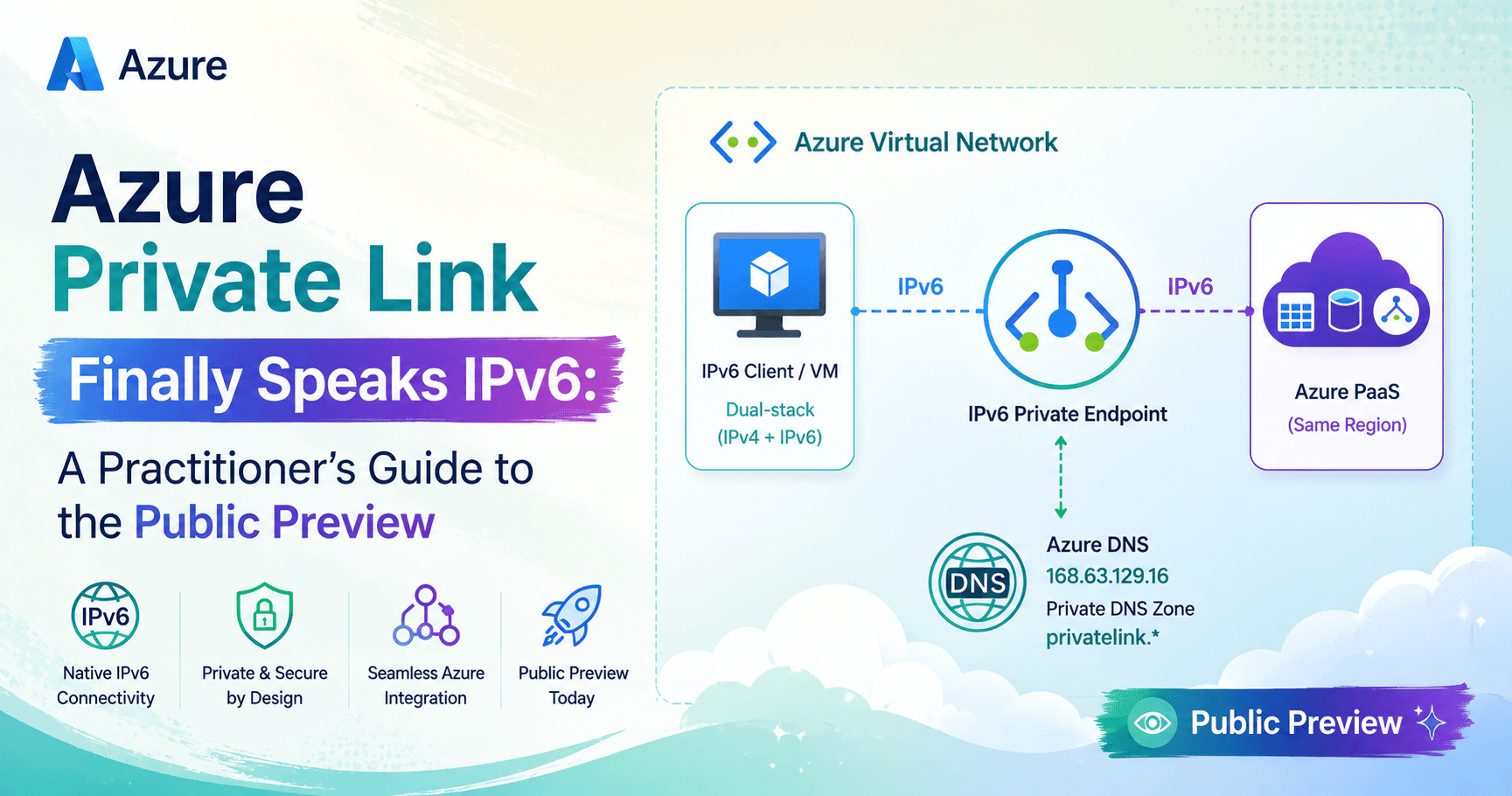
That wall just came down. Azure Private Link over IPv6 is now in public preview, and it brings two things: IPv6 private endpoints for Azure PaaS, and — more interestingly — an on-premises path over ExpressRoute using a brand-new Azure resource type called the Virtual Network Routing Appliance (VNRA).
This post walks through what the preview actually gives you, the three configuration flags that will silently break your deployment if you miss them, the region math that most write-ups skip, and the operational consequences you need to design around before you put anything real on it.
Preview status. Microsoft is explicit that this feature carries no SLA and is not recommended for production workloads. Some capabilities are constrained or absent. Treat everything below as design-and-validate material, not a production runbook.
What you actually get
Two connectivity patterns are supported today.
Scenario A — Azure-native
An IPv6-addressed VM sitting in a dual-stack VNet resolves the PaaS FQDN to an AAAA record and connects directly to an IPv6 private endpoint.
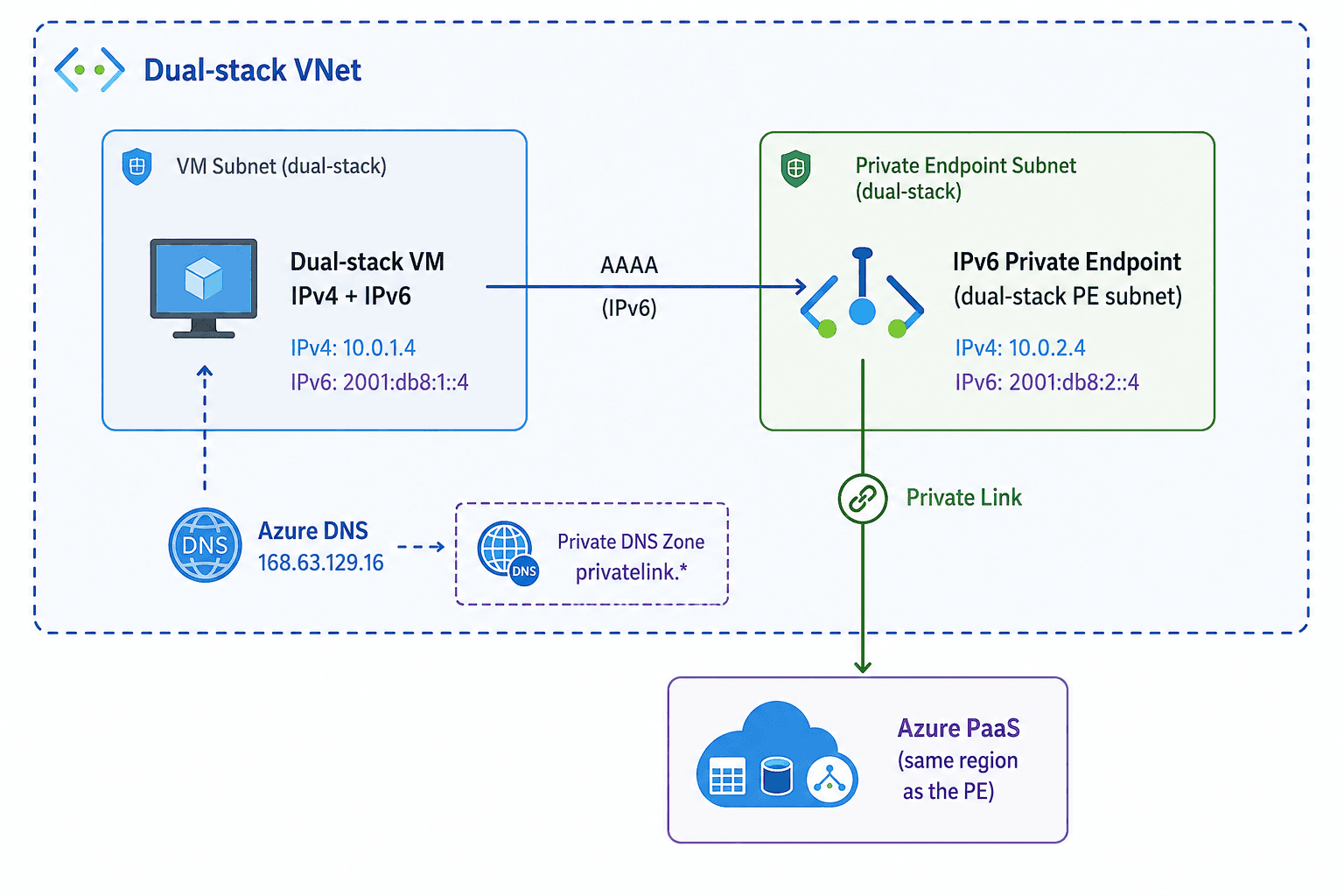
Scenario B — On-premises over ExpressRoute
This is the genuinely new architecture. On-premises IPv6 clients reach the private endpoint over ExpressRoute, but not directly — ExpressRoute hands the traffic to a Virtual Network Routing Appliance deployed in the gateway VNet, and the appliance forwards it to the IPv6 private endpoint.
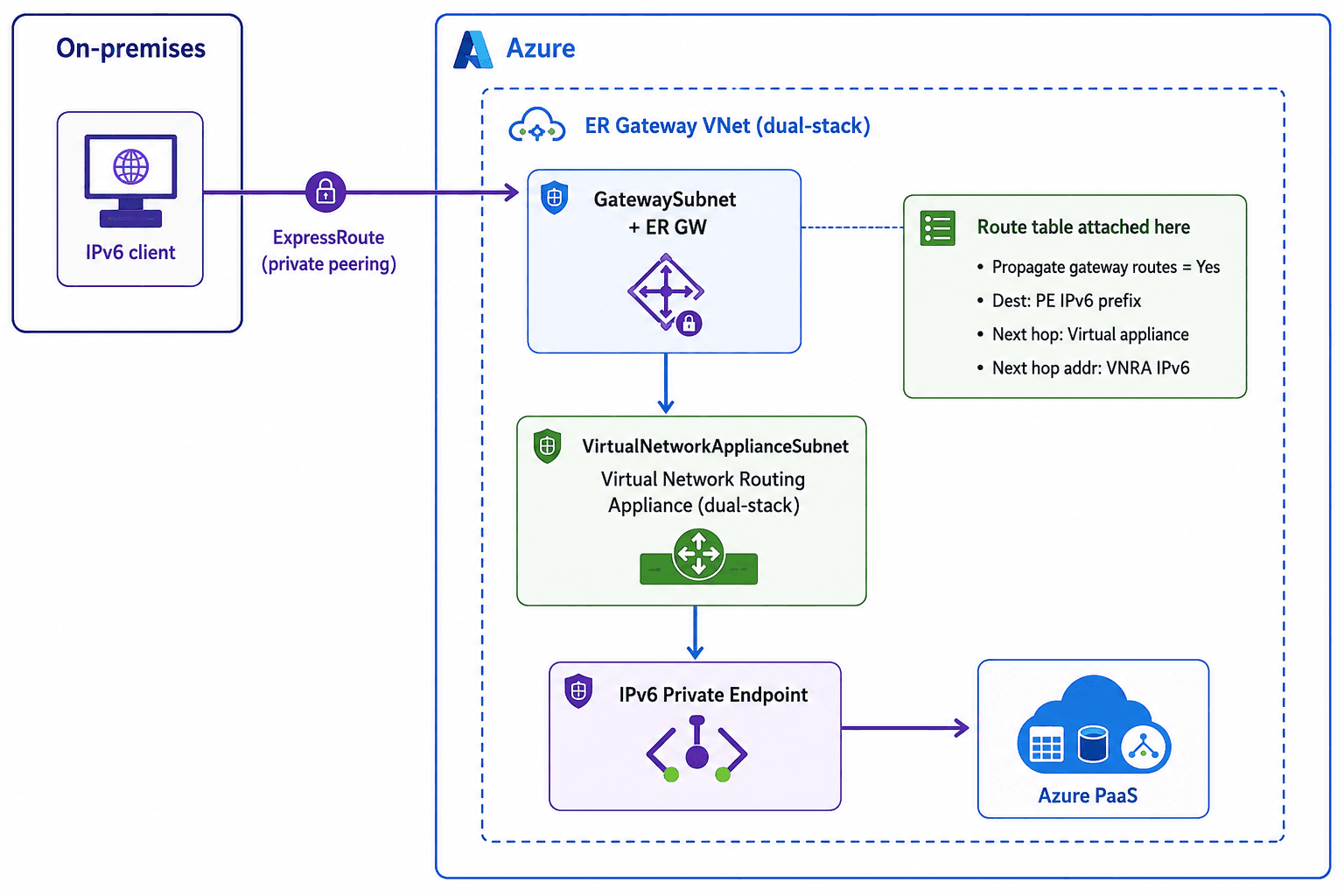
The key insight is that the VNRA is a routing hop, not a security appliance. It exists because the ExpressRoute-to-private-endpoint IPv6 data path needs an explicit forwarder inside the VNet. That's also why the route table goes on GatewaySubnet rather than on the private endpoint subnet — you are steering inbound ExpressRoute traffic toward the appliance, not steering PE egress.
Scope: what's in, what's out
Dimension | Preview state |
|---|---|
PaaS services | Azure Storage, Azure SQL Database, Azure Key Vault, Azure Data Explorer (Kusto) |
Regions | West Central US, East Asia, UK South, Central US, North Europe |
PE ↔ resource locality | Must be same region. No cross-region private endpoints. |
On-premises transport | ExpressRoute only. No VPN Gateway, no Virtual WAN, no third-party NVAs. |
NSG / ASG | Not supported with Private Link over IPv6 in this preview. |
Client source IP fidelity | Not preserved — implicit NAT means downstream service logs show the VNet-side translated address. |
Support model | Product-group support via a preview request form, not standard Azure support channels. |
The region math everyone skips
Here's something you won't get from reading the Private Link article alone. Scenario B depends on a second preview — the Virtual Network Routing Appliance — and that preview has a different region list.
Region | Private Link over IPv6 | Routing Appliance |
|---|---|---|
West Central US | ✅ | ✅ |
East Asia | ✅ | ✅ |
UK South | ✅ | ✅ |
North Europe | ✅ | ✅ |
Central US | ✅ | ❌ |
West US, East US, East US 2, West Europe | ❌ | ✅ |
Practical takeaway: if your proof of concept needs on-premises ExpressRoute connectivity, your usable region set is West Central US, East Asia, UK South, and North Europe — four regions, not five. Central US will give you IPv6 private endpoints for Azure-native workloads, but you can't build the VNRA hop there today. Pick your PoC region from the intersection, or you'll get halfway through the build before discovering the appliance won't deploy.
It's worth noting the routing appliance carries its own preview constraints: Microsoft asks you to use a non-production subscription, gates it behind an Azure Feature Exposure Control flag (Microsoft.network/AllowVirtualNetworkAppliance), and requires a separate sign-up form with manual product-team approval. Creation requests can be denied outright if a region is short on capacity. Build lead time into your plan — this is not a self-service az feature register and go.
The three flags that will break you
This is where most first attempts fail, because two of the three prerequisites look like unrelated scale settings.
1. Subscription feature registration
Mandatory, and it must be done before you create anything:
az feature register \
  --namespace Microsoft.Network \
  --name SupportIPv6PrivateEndpoint \
  --subscription <subscription-id>

az provider register --namespace Microsoft.Network
Verify it actually landed before moving on:
az feature show \
  --namespace Microsoft.Network \
  --name SupportIPv6PrivateEndpoint \
  --query properties.state -o tsv
Wait for Registered. The provider re-registration is what pushes the flag into the resource provider — skipping it leaves you registered on paper and failing in practice.
2. VNet-level: privateEndpointVNetPolicies = Basic
"privateEndpointVNetPolicies": "Basic"If that property looks familiar, it's because it's the same switch that enables High Scale Private Endpoints — the feature that lifts the 1,000-private-endpoint-per-VNet ceiling. Private Link over IPv6 rides on that same underlying data-path model, which is why the flag is a prerequisite here even if you only plan to deploy one endpoint.
That inheritance matters operationally. Toggling this property triggers a platform update and a one-time connection reset of long-running private endpoint connections in that VNet. If you're enabling it on a VNet that already carries IPv4 private endpoints with persistent sessions, do it in a maintenance window. And be aware that per-endpoint Bytes In/Out monitoring behaves differently under the high-scale model — if your observability depends on those metrics, validate before you commit.
az network vnet update \
  --name <vnet-name> \
  --resource-group <resource-group-name> \
  --pe-vnet-policies Basic
3. Subnet-level: privateEndpointNetworkPolicies = RouteTableEnabled
"privateEndpointNetworkPolicies": "RouteTableEnabled"The privateEndpointNetworkPolicies property accepts Disabled, NetworkSecurityGroupEnabled, RouteTableEnabled, or Enabled. The historical default guidance for private endpoint subnets was Disabled — which is precisely why this trips people up. Here you need UDR enforcement on, because the whole Scenario B data path depends on user-defined routes being honoured in the private endpoint subnet.
Note the Azure CLI limitation: az network vnet subnet update --disable-private-endpoint-network-policies only accepts true/false and can't select the route-table-only mode. Use PowerShell, ARM/Bicep, or the portal for the granular value:
$vnet = Get-AzVirtualNetwork -ResourceGroupName '<rg>' -Name '<vnet>'
Set-AzVirtualNetworkSubnetConfig `
  -Name '<pe-subnet>' `
  -VirtualNetwork $vnet `
  -AddressPrefix '<ipv4-prefix>','<ipv6-prefix>' `
  -PrivateEndpointNetworkPoliciesFlag 'RouteTableEnabled'
$vnet | Set-AzVirtualNetwork
Or declaratively in Bicep:
resource vnet 'Microsoft.Network/virtualNetworks@2023-11-01' = {
  name: vnetName
  location: location
  properties: {
    addressSpace: {
      addressPrefixes: [ '10.0.0.0/16', 'fd00:db8:deca::/48' ]
    }
    privateEndpointVNetPolicies: 'Basic'
    subnets: [
      {
        name: 'snet-pe'
        properties: {
          addressPrefixes: [ '10.0.1.0/24', 'fd00:db8:deca:1::/64' ]
          privateEndpointNetworkPolicies: 'RouteTableEnabled'
        }
      }
    ]
  }
}
Address planning: the /64 rule
Before you write a single line of deployment code, get the addressing right — IPv6 in Azure is stricter than IPv4 and the constraints are not negotiable.
IPv6 subnets must be exactly /64. No other prefix length is supported, full stop. This is not a recommendation; it's a hard platform rule.
Your VNet's IPv6 address space must therefore be large enough to carve a /64 for every subnet that needs IPv6 — the private endpoint subnet, the VM subnet, the
VirtualNetworkApplianceSubnet, andGatewaySubnetin Scenario B.Azure reserves five addresses in every subnet (network identifier, default gateway, two for DNS mapping, and broadcast). At /64 that's irrelevant for capacity, but it matters when you're reasoning about first-usable addresses in your route tables.
Plan IPv6 alongside IPv4 during initial network design. Retrofitting an IPv6 plan onto an existing VNet is painful in a way that adding an IPv4 subnet is not.
A workable starting layout for a PoC:
Subnet | IPv4 | IPv6 |
|---|---|---|
| 10.0.0.0/24 | fd00:db8:deca:0::/64 |
| 10.0.1.0/24 | fd00:db8:deca:1::/64 |
| 10.0.2.0/24 | fd00:db8:deca:2::/64 |
| 10.0.3.0/27 | fd00:db8:deca:3::/64 |
Building it: Scenario A
Create the private endpoint
The only genuinely new parameter is --ip-version-type, which decides whether the endpoint gets an IPv4 or IPv6 address:
az network private-endpoint create \
  --name pe-storage-ipv6 \
  --resource-group rg-plipv6-poc \
  --vnet-name vnet-plipv6 \
  --subnet snet-pe \
  --private-connection-resource-id <resource-id-of-target-service> \
  --group-id blob \
  --connection-name conn-storage-ipv6 \
  --location uksouth \
  --ip-version-type IPv6
Everything else — approval workflow, connection state, group IDs — behaves exactly as it does for IPv4 private endpoints.
Wire up DNS
DNS is where the IPv6 story is refreshingly boring: the model is unchanged. Same private DNS zones, same zone-group mechanics, same conditional-forwarding rules. The only difference is that the record created is an AAAA rather than an A.
Zone names for the four supported services:
Service | Private DNS zone | Public forwarder target |
|---|---|---|
Azure Storage (blob) |
|
|
Azure SQL Database |
|
|
Azure Key Vault |
|
|
Azure Data Explorer |
|
|
Three rules that apply just as hard here as they do for IPv4:
Conditional-forward to the public zone, not the privatelink zone. From on-premises DNS you forward
database.windows.net— neverprivatelink.database.windows.net. Forwarding the privatelink zone directly is one of the most common private endpoint failure modes in the field.One zone per service, one zone instance globally. Don't share a private DNS zone across two different services' private endpoints — you'll trigger record deletion and intermittent resolution failures. And in hub-and-spoke, link a single zone to all spokes rather than creating a same-named zone per VNet.
Use the DNS zone group. Attaching the zone via a private DNS zone group means records are created, updated, and cleaned up with the endpoint lifecycle. A zone group supports up to five zones, one zone per zone name, and only one zone group per private endpoint.
Validate
From the dual-stack VM:
nslookup <storage-account>.blob.core.windows.netYou want to see the CNAME chain land on the privatelink zone with an AAAA answer:
<storage-account>.privatelink.blob.core.windows.net
AAAA: <private endpoint IPv6 address>
Then confirm the data plane:
curl -v https://<storage-account>.blob.core.windows.netTest-NetConnection <storage-account>.blob.core.windows.net -Port 443Pro tip: pass curl -6 explicitly during testing. On a dual-stack host, a successful curl proves a path worked — not that IPv6 worked. Forcing the family removes the ambiguity.
Building it: Scenario B
Components
An ExpressRoute circuit with a gateway SKU appropriate to your connectivity model (standard or FastPath).
A dual-stack Virtual Network Routing Appliance in the ExpressRoute gateway VNet. The portal places it in a dedicated subnet named
VirtualNetworkApplianceSubnet; additional instances go into that same subnet. Capacity is selected at creation (50 Gbps in the documented walkthrough), and you can optionally attach an NSG and route table to the appliance's subnet.A user-defined route pointing ExpressRoute-sourced traffic at the appliance.
The route table
Setting | Value |
|---|---|
Propagate gateway routes | Yes |
Destination type | IP Addresses |
Destination | Private endpoint IPv6 prefix |
Next hop type | Virtual appliance |
Next hop address | VNRA IPv6 address |
Associate this route table with GatewaySubnet in the VNet hosting the appliance.
Two details worth pausing on. First, Propagate gateway routes must stay Yes — you're adding a specific override for the private endpoint prefix, not replacing ExpressRoute's learned routes. Turning propagation off will black-hole the rest of your hybrid traffic. Second, the destination is the private endpoint subnet prefix, not a host address, so the route survives endpoint recreation and additional endpoints in the same subnet.
Validate the hybrid path
From the on-premises client:
Resolve the PaaS FQDN and confirm you get the private endpoint's IPv6 address.
Connect using the standard service FQDN — never a privatelink-suffixed name.
Confirm the connection is genuinely established over IPv6, that data-plane operations succeed, and that dual-stack clients behave predictably (this last one matters more than it sounds — see below).
If step 1 works and step 2 doesn't, your problem is routing, not DNS. Check the UDR association on GatewaySubnet, then confirm the appliance is receiving traffic at all — NSG flow logs on the appliance subnet, where available, are the fastest way to prove or disprove that hop.
The consequences you have to design around
This is the part that separates a demo from a design. Four preview limitations have real architectural weight.
1. No NSGs or ASGs
Network security groups and application security groups are not supported with Private Link over IPv6 in this preview. If your private endpoint governance model relies on NSGs on the PE subnet — and in most enterprise landing zones it does — that control simply isn't available on the IPv6 path. You'll need to lean on service-level controls instead: storage account network rules, SQL firewall and Entra ID authentication, Key Vault access policies and RBAC.
Combine this with the next point and the picture gets sharper.
2. Azure Firewall, Virtual WAN, and Route Server don't support IPv6 at all
This isn't a Private Link limitation — it's a platform-wide IPv6 gap, and it collides badly with the standard enterprise hub-and-spoke pattern. Azure Firewall requires an IPv4-only subnet. Virtual WAN is IPv4-only. Route Server is IPv4-only. VPN Gateway supports IPv6 only in dual-stack preview with opt-in, and in any case VPN isn't a supported transport for this feature.
So if your reference architecture routes all private endpoint traffic through Azure Firewall for inspection, that pattern does not extend to IPv6 Private Link. You cannot inspect this traffic with Azure Firewall today. Either you terminate IPv6 before the inspection layer and accept an IPv4 inspected path, or you accept an uninspected IPv6 path with compensating controls at the service tier. That's a security-review conversation, not an implementation detail — have it early.
3. Source IP is not preserved
Because of implicit NAT in the IPv6 Private Link data path, the original client IPv6 address does not reach the destination service. Downstream logs show a VNet-side translated source address instead.
Think through what that breaks in your environment:
Storage diagnostic logs and SQL audit logs lose per-client attribution. Forensic "which host touched this container" questions become unanswerable from service logs alone.
Any IP-based allow-listing at the service tier loses granularity — you're allowing a translated address, not a specific client.
Conditional Access or risk policies keyed on source IP will see the wrong value.
Cost and usage attribution by client IP stops working.
The mitigation is to push identity down the stack: use Entra ID / managed identity authentication and correlate on principal rather than address, and instrument at the client side where you still control the context.
4. Same-region only, four services, four usable regions
No cross-region private endpoints means the global private endpoint patterns — a hub in one region fronting PaaS resources in several — don't apply here. Every private endpoint sits beside its resource. Combined with the four-service list and (for hybrid) the four-region intersection, the realistic scope of a first deployment is narrow. That's fine for a PoC; it's a hard stop for a platform rollout.
IPv4 vs IPv6 Private Link at a glance
IPv4 Private Link (GA) | IPv6 Private Link (Preview) | |
|---|---|---|
Subscription registration | Not required |
|
VNet policy prerequisite | None |
|
Subnet policy | Commonly | Must be |
PE creation parameter | Default |
|
DNS record type | A | AAAA |
DNS zone model | Private DNS zones + zone group | Identical |
Cross-region PE | Supported | Not supported |
On-premises transport | ExpressRoute, VPN, vWAN, NVA | ExpressRoute + VNRA only |
NSG / ASG on PE subnet | Supported | Not supported |
Azure Firewall inspection | Supported | Not possible (platform IPv6 gap) |
Client source IP in service logs | Preserved | NAT-translated |
Supported services | 100+ | Storage, SQL, Key Vault, Data Explorer |
SLA | Standard | None (preview) |
Where this is heading
Reading the limitations together tells you something about the roadmap. Cross-region support, VPN and Virtual WAN transports, NSG/ASG enforcement, source IP preservation, and a broader PaaS catalogue are all the obvious next milestones — and the fact that the feature is built on the High Scale Private Endpoint data path suggests the scale ceiling was never the concern.
The more interesting signal is the Virtual Network Routing Appliance itself. Introducing a first-party, managed, capacity-sized forwarding resource into the VNet — one that can carry its own NSG and route table — looks like more than a Private Link IPv6 accessory. It's the kind of primitive you'd build if you wanted a native alternative to third-party NVAs for VNet-internal routing generally.
For now, the honest assessment is this: Private Link over IPv6 closes a real architectural gap that has forced awkward compromises in every IPv6-first Azure design. It is genuinely useful for validating that your IPv6 estate can reach PaaS privately end-to-end. But with no SLA, no NSGs, no firewall inspection, no source IP fidelity, and four services in four regions, it belongs in a lab this quarter — not in a landing zone.
Build the PoC. File the feedback. Plan the production design for the GA that this preview is clearly setting up.