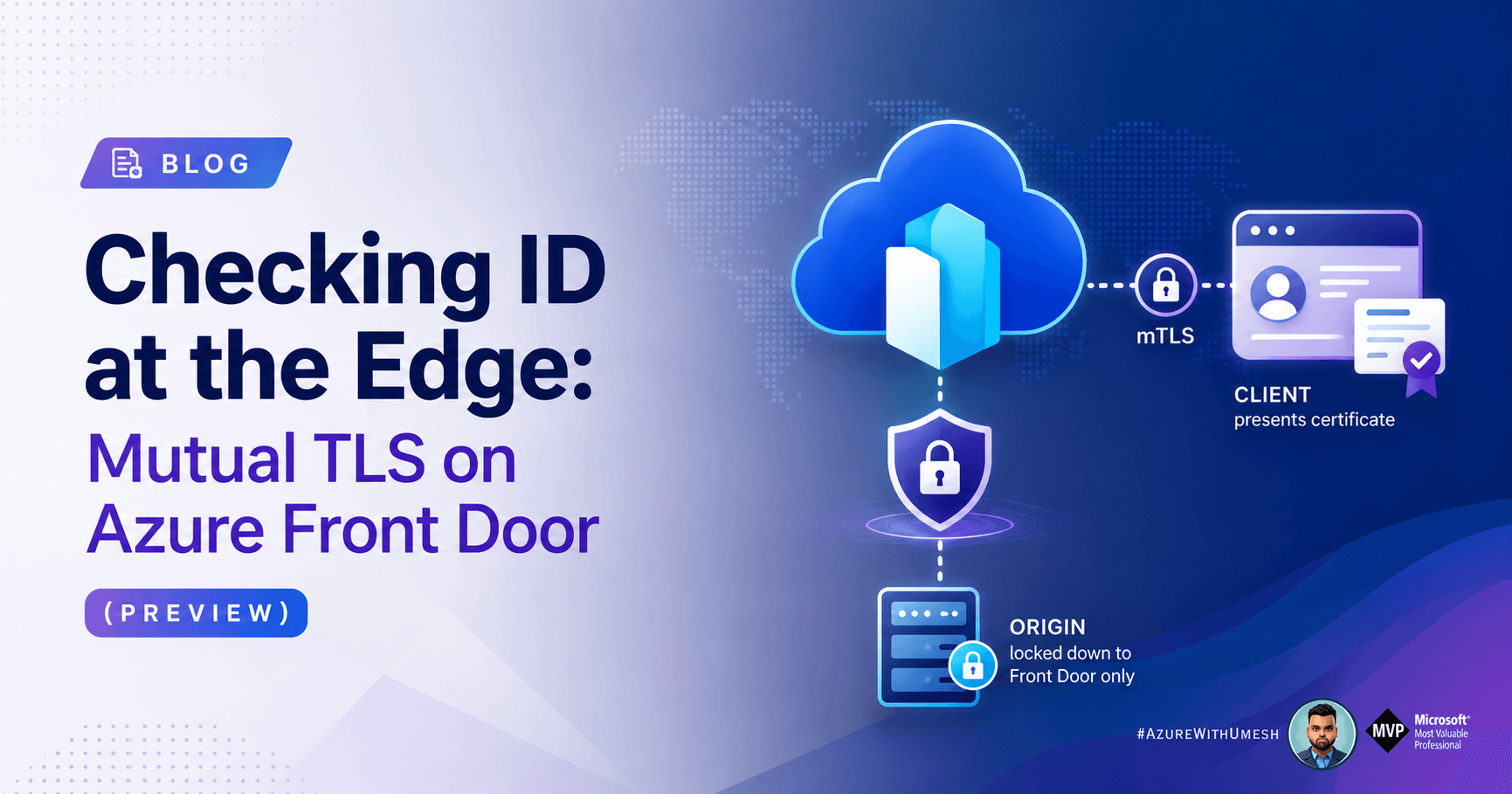
Standard TLS asks one question: is the server who it claims to be? Mutual TLS asks it in both directions — the client has to produce a certificate too, and Front Door checks it before a single byte reaches your origin.
Microsoft has now brought that capability to the Front Door edge. If you run B2B APIs, IoT fleets, banking front-ends, VPN portals or partner integrations, this is the feature that lets you stop unauthenticated clients ~4,000 km from your origin instead of at your app server.
Here's what actually matters, in the order you'll hit it.
The flow at a glance
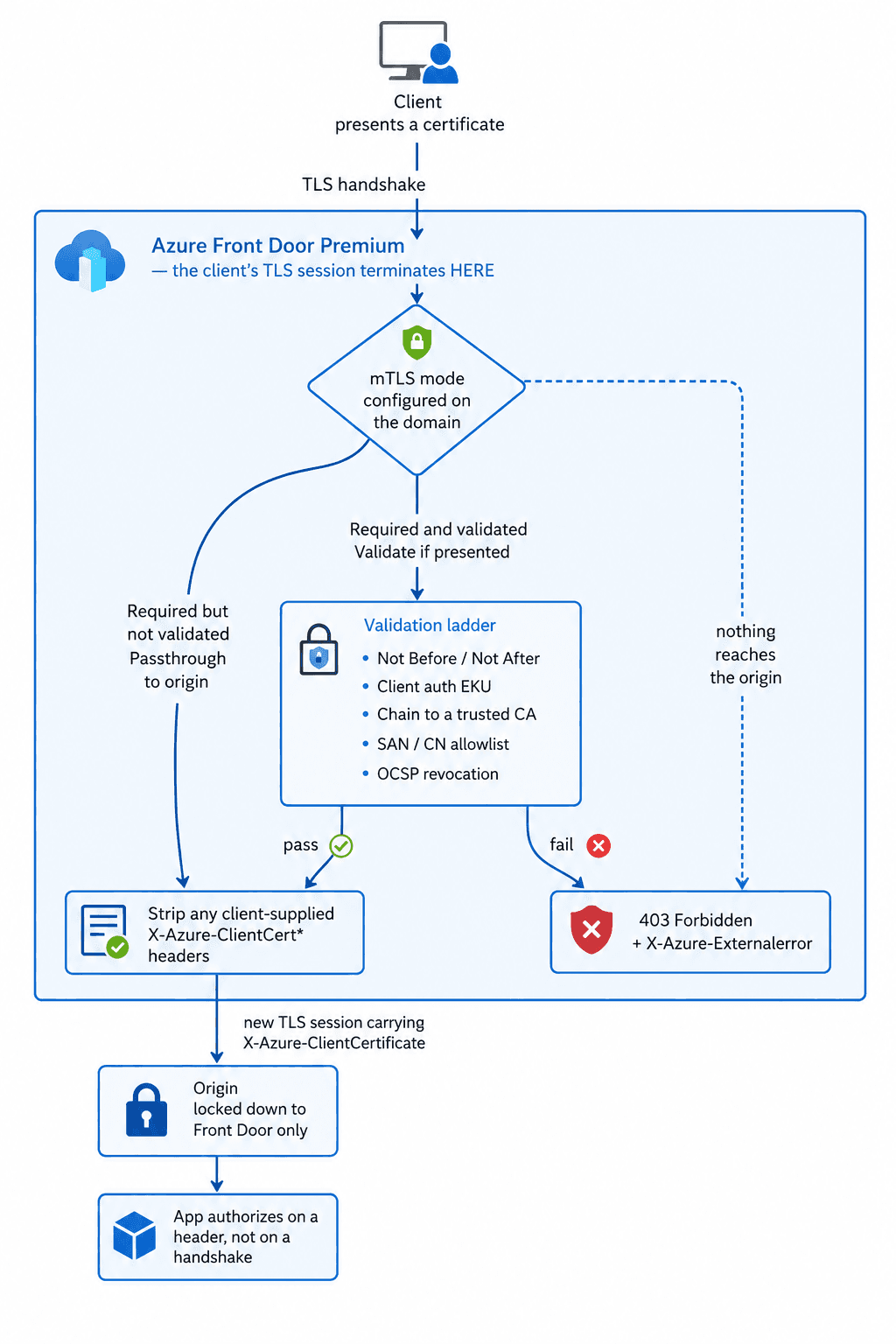
Three things to read off this diagram, because they explain most of the rules further down: the client's TLS session ends at the edge, the certificate travels onward as a header rather than a second handshake, and the origin is only genuinely protected if it refuses traffic that didn't come through Front Door. (Caching is disabled on mTLS routes for the same reason — a cache would answer before the ladder ever ran.)
1. Four doors, not one switch
mTLS isn't on/off. Front Door gives you four enforcement modes, and picking the wrong one is the most common design mistake.
Mode | Cert required? | Who validates? | Pick it when… |
|---|---|---|---|
Required and validated (default when mTLS is on) | Yes | Front Door — full chain, revocation, SAN/CN | You want the edge to be the authority. Start here. |
Required but not validated | Yes | Your origin | Your app has custom trust logic Front Door can't express |
Validation if presented | No | Front Door, if a cert shows up | Mixed traffic: some clients authenticate, some don't |
Passthrough to origin | No | Your origin, entirely | You want the edge transparent and the origin in charge |
In the validating modes, Front Door hands the certificate to your origin in the X-Azure-ClientCertificate header — so the app still gets to make authorization decisions, it just doesn't have to make authentication ones.
2. The validation ladder
When Front Door validates, it walks this list:
Certificate is inside its
Not Before/Not AfterwindowExtended Key Usage is either absent, or contains the client authentication OID
Format and integrity are intact — nothing has been altered
The chain is unbroken up to a trusted issuer for that domain
Then two checks you opt into:
SAN/CN allowlist — SAN is evaluated first; if it's empty or doesn't match, CN is tried. One match wins. ⚠️ Your Front Door custom domain hostname must be explicitly present in this list, or validation fails. Wildcards aren't supported in the allowlist, though a wildcard in the client cert's SAN/CN will match one level of subdomain you've listed.
Revocation via OCSP — on by default. Front Door reads the OCSP responder from the cert's AIA extension. Revoked cert → HTTP 403 with a reason, and the request never leaves the edge.
3. The EKU time bomb 💣
This is the paragraph most people skim, and it's the one that will break production.
Front Door enforces the client-authentication EKU. Meanwhile, public certificate authorities are — due to industry-wide changes — about to stop issuing client-auth certificates with that EKU at all.
The consequence is blunt: design for private CAs. Front Door accepts certs from both public and private authorities today, but only private CAs will keep issuing what this feature requires. If you're architecting mTLS around a public CA right now, you're building on a shelf that's being removed.
Related asterisk: the industry is also drifting away from OCSP, but OCSP is currently the only revocation mechanism Front Door checks.
4. The choreography problem
mTLS is configured on the domain, but it's enforced at the endpoint — a deliberate guardrail so nobody can reach your origin around the check. That coupling creates ordering rules, and violating them means downtime.
The rules:
Enable mTLS on the endpoint first, then attach mTLS domains to routes under it.
No mixed states. An endpoint can't host both mTLS and non-mTLS domains.
The default
.z01.azurefd.netendpoint domain can't be associated with routes on an mTLS-enforced endpoint. Detach it before enabling.Caching is off the table — no caching on routes, no rules-engine cache overrides. Cached content would otherwise be served to unauthenticated clients.
Turning mTLS on for an existing domain (unavoidably disruptive):
Create or reuse an endpoint with mTLS enabled
Disassociate the domain from its current non-mTLS endpoint and routes
Reassociate it to the mTLS endpoint
Turning it off is the same dance in reverse — disassociate, disable on the domain, reassociate elsewhere. Mitigation: route traffic straight to origin while you make the change.
The one-line takeaway: enable mTLS on new endpoints and new domains. Retrofitting costs an outage in both directions.
5. Configuration in six moves
Upload the CA chain — Front Door profile → Security → Mutual TLS CA certificates → + Add, sourced from Azure Key Vault.
Create the endpoint — Front Door manager → + Add an endpoint → check Enforce mutual TLS.
Create the domain — Domains → + Add → Advanced settings → Enable mutual TLS. Choose your mode, select the CA cert, set revocation checking, and populate the SAN/CN list (including your own custom domain hostname).
Add the route under that endpoint, pointing at the right origin group.
Test before DNS — bind your local hosts file to a Front Door IP and verify enforcement, then cut the CNAME over.
Lock down the origin so it only accepts traffic from your Front Door instance. Without this, an attacker simply skips the edge — and your mTLS with it. (Secure traffic to Azure Front Door origins)
6. Debugging a 403 without guessing
Send X-Azure-DebugInfo: 1 with your request. Front Door replies with X-Azure-Externalerror and a specific reason:
Error value | What it means |
|---|---|
| No certificate presented |
| Past its validity window |
| Leaf or issuer revoked |
| Issuer and leaf are the same cert |
| Issuer can't be located |
| Root CA isn't trusted |
| Subject name ≠ issuer name |
| EKU isn't client authentication — see §3 |
| CN/SAN not in your allowed list |
| More than five certs including the leaf |
| Oversized request header |
| Generic fallback |
For steady-state visibility, the feature emits metrics for total mTLS requests, failed mTLS requests, and errors broken down by type, SNI hostname and TLS protocol.
7. Limits worth memorising
One root CA + up to three intermediates
PEM-encoded, under 25 KB
No auto-rotation — calendar it
Two CA certificates can be attached simultaneously; Front Door uses whichever is valid at runtime, giving you seamless rollover at expiry or revocation
Client cert chain must not exceed five certificates including the leaf
Front Door also strips and replaces any client-supplied X-Azure-ClientCert* headers (…Subject, …Issuer, …Serial, …Fingerprint, …StartDate, …EndDate, …Verify, and X-Azure-ClientCertificate) before forwarding — so spoofed identity headers can't sneak through.
The mental model
Front Door terminates the client's TLS session at the edge. It does not re-present the client's certificate to your origin — it forwards it as a header. That distinction drives everything downstream: your origin authorizes on a header, not on a handshake, which is exactly why step 6 (origin lockdown) isn't optional.
Treat mTLS as a posture change, not a checkbox: new endpoint, new domain, private CA, no caching, origin restricted, rotation on the calendar.
Preview caveat: mutual TLS on Azure Front Door is in preview and governed by the Supplemental Terms of Use for Microsoft Azure Previews. Don't take a production dependency without accounting for that.
Official references