Introduction: The Evolution of Dynamic Routing in Azure
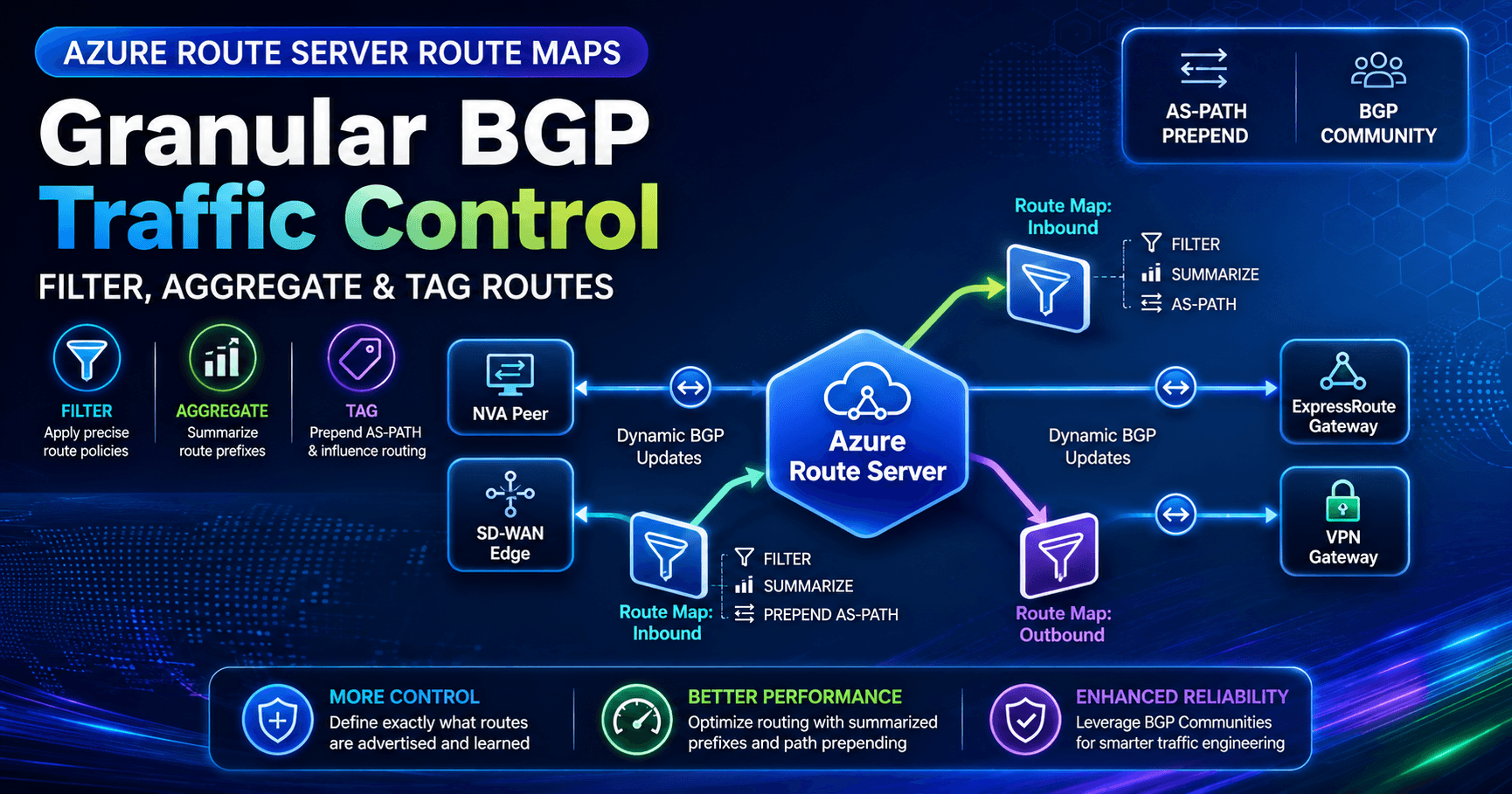
When Microsoft introduced Azure Route Server (ARS), it solved a longstanding pain point in enterprise cloud architectures: the maintenance of tedious static User-Defined Routes (UDRs). By acting as an in-memory BGP Route Reflector inside a Virtual Network (VNet), Azure Route Server enabled Network Virtual Appliances (NVAs)—such as Fortinet, Palo Alto, Cisco SD-WAN, and Check Point—to dynamically exchange routes with Azure's Software-Defined Network (SDN) and ExpressRoute/VPN gateways.
However, early implementations of Route Server operated on a "pass-through" model: any prefix advertised by an NVA or gateway was blindly accepted, programmed into Azure route tables, and reflected to downstream peers. Network engineers faced distinct limitations:
No Native Filtering: Unwanted routes advertised by SD-WAN edge devices could easily contaminate Azure SDN routing.
Lack of Path Manipulation: Setting up active/passive failover across hybrid links required configuring complex local preference or AS-PATH rules directly on on-premises routers or third-party appliances.
Route Table Limit Exhaustion: On-premises routers or ExpressRoute connections frequently hit maximum route advertisement thresholds because Azure could not aggregate prefixes at the hub edge.
Enter Azure Route Server Route Maps. Route Maps introduces a stateful policy evaluation engine directly onto the Route Server pipeline, enabling fine-grained, policy-driven control over BGP updates without requiring changes to on-premises routers or third-party NVAs.
What are Route Maps for Azure Route Server?
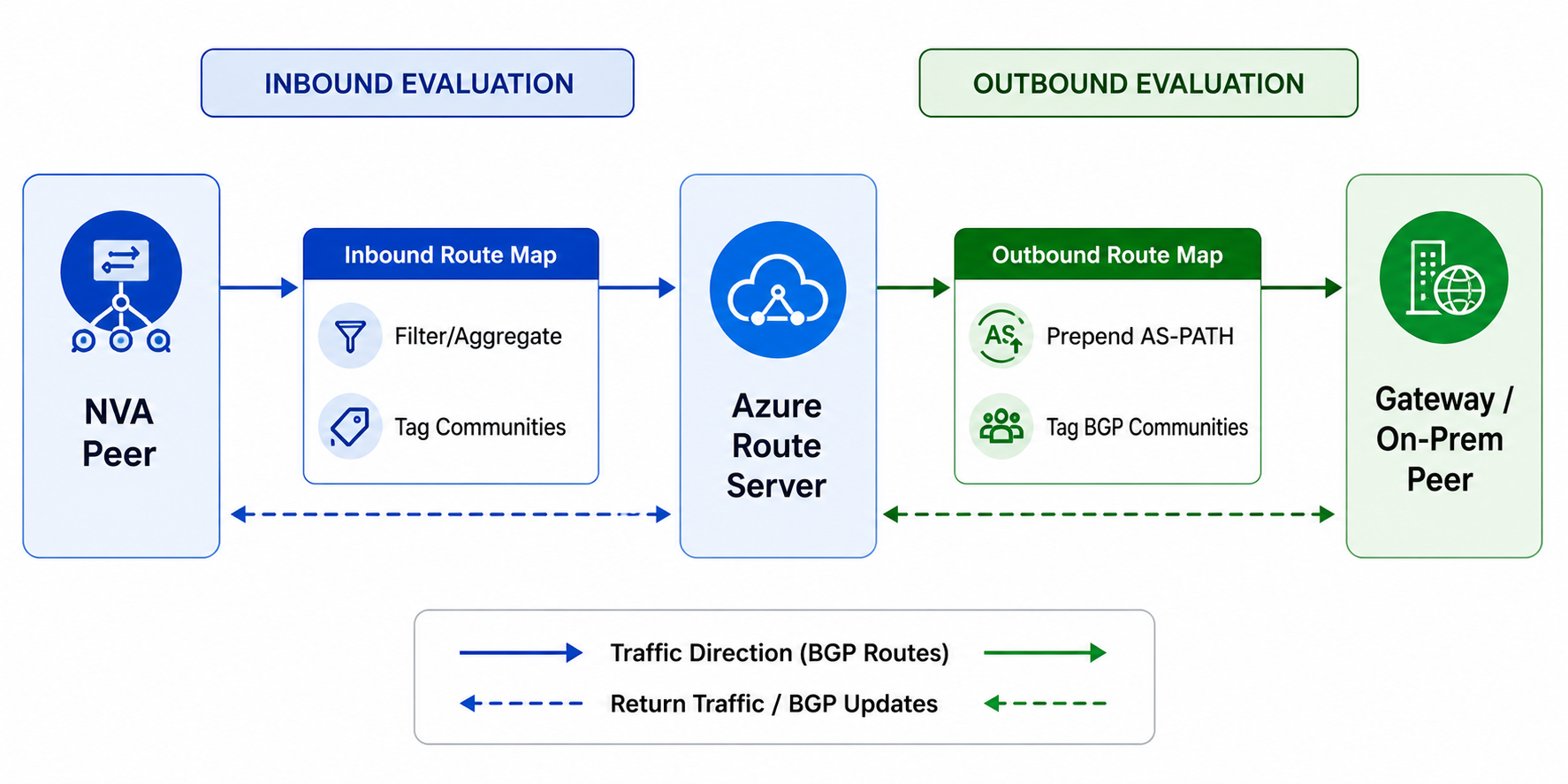
At its core, a Route Map is an ordered sequence of rules that evaluates BGP route updates entering (Inbound) or leaving (Outbound) Azure Route Server. Much like traditional Cisco or Juniper BGP route-maps, each rule contains two key elements:
Match Conditions: Logic criteria that inspect a route’s Prefix, AS-PATH, or BGP Community.
Actions: Policy enforcement instructions that either Drop (filter) the route or Modify its attributes (e.g., prefix replacement, AS-PATH prepending, or community tagging).

Where Route Maps Can Be Applied
Route Maps are attached at the connection level for three primary Azure resource types within the same VNet:
BGP Peerings: Direct BGP sessions with third-party NVAs or SD-WAN appliances.
ExpressRoute Gateway Connections: Inter-VNet routing links between Route Server and ExpressRoute.
VPN Gateway Connections: Site-to-Site VPN connections integrated with dynamic routing.
Crucial Egress Rule: You can attach maximum one Inbound and one Outbound route map per connection. Outbound route maps modify advertisements departing Route Server; they do not alter Azure Route Server’s internal best-path selection process (which evaluates before outbound maps are executed).
Architectural Deep-Dive: Rule Processing Engine
Understanding how Azure Route Server processes rules is vital to avoiding accidental routing loops or dropped traffic.
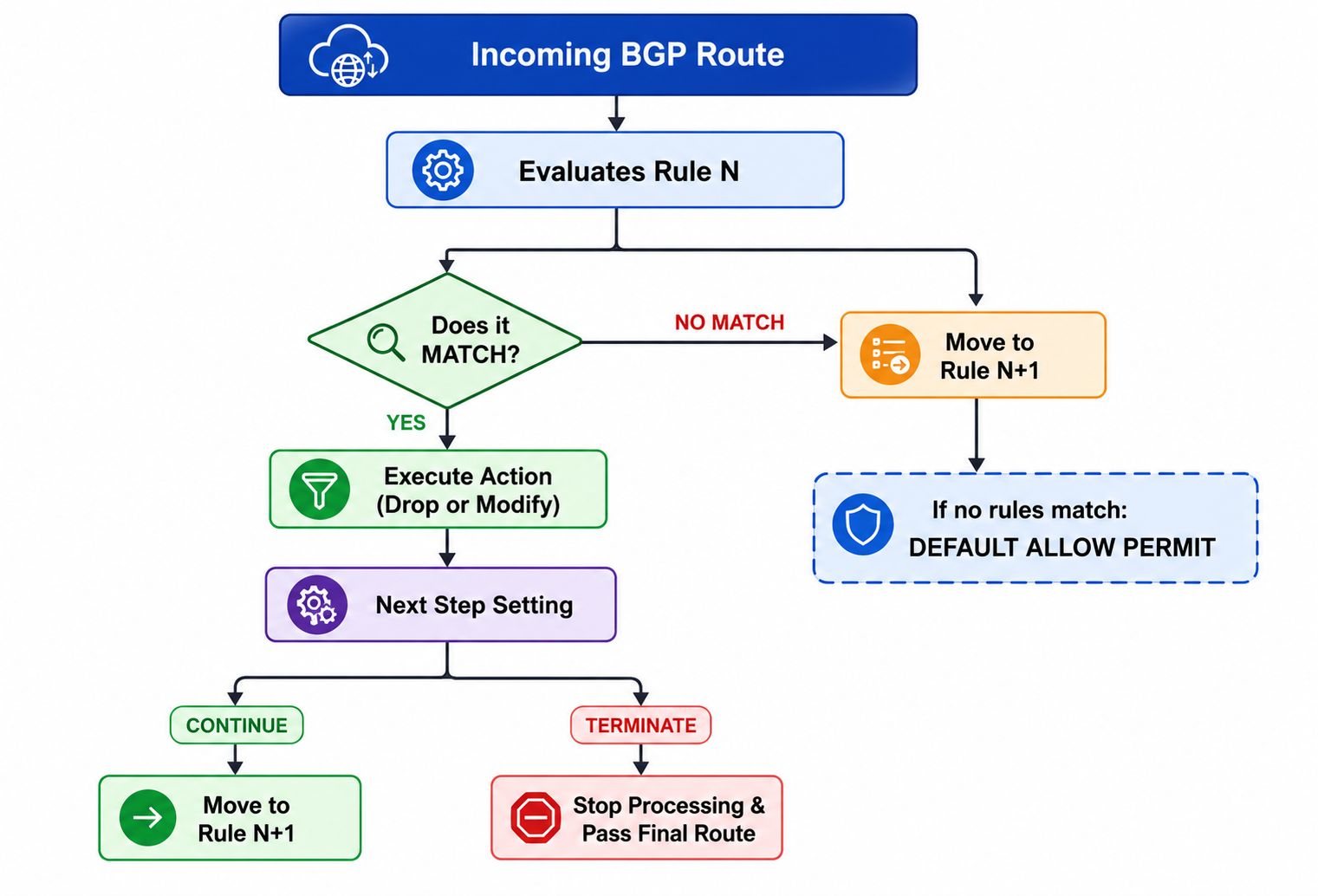
Key Execution Rules:
Implicit Default Allow: Unlike traditional firewall ACLs or Cisco route-maps (which default to an implicit
deny all), Azure Route Server Route Maps default to ALLOW. If a route fails to match any rule in a route map, it is allowed through unmodified.AND Match Logic: When a single rule contains multiple match conditions (e.g., Prefix =
10.1.0.0/16AND AS-Path =65001), the route must meet all conditions to trigger the rule.Next Step Control (
Continuevs.Terminate):Continue: Applies the rule's actions and continues evaluating subsequent rules in the chain.Terminate: Applies the rule's actions and immediately exits the route map processing pipeline.
Rules Without Match Conditions: A rule configured without any match conditions acts as a wildcard, matching 100% of routes flowing through that connection.
Match Criteria & Action Specifications
Azure Route Server supports a rich set of matching criteria and modification actions:
Supported Match Criteria
Property | Criterion | Value Example | Operational Interpretation |
Route-prefix |
|
| Exact match only. Specific subnets underneath (e.g., |
Route-prefix |
|
| Subnet match. Matches |
Community |
|
| Route must contain all specified BGP community tags. Order is irrelevant. |
Community |
|
| Route must contain at least one of the listed BGP communities. |
AS-Path |
|
| Route's |
AS-Path |
|
| Route's |
Supported Modification Actions
Property | Action | Value Example | Operational Effect |
Route-prefix |
|
| Filters out (drops) matching route advertisements. |
Route-prefix |
|
| Summarization. Replaces all matching specific prefixes with the specified aggregate prefix. |
AS-Path |
|
| AS-PATH Prepending. Prepends the specified list of 2-byte ASNs to the left side of the path. |
AS-Path |
|
| Replaces the entire |
Community |
|
| Appends custom BGP community string to the route. |
Community |
|
| Overwrites existing communities with the specified string. |
Community |
|
| Removes matching community strings from the route. |
4 Real-World Architectural Blueprint Scenarios
Scenario 1: Active/Passive Failover via AS-PATH Prepending
The Challenge: An enterprise connects its Azure VNet to an on-premises data center via two paths: a high-speed primary ExpressRoute link and a secondary backup Site-to-Site VPN link. By default, Azure ECMP or shortest AS-path routing might send outbound enterprise traffic over the VPN or split load across both links unpredictably.
The Solution: Apply an Outbound Route Map to the VPN Gateway connection that prepends Azure's ASN (64512) twice. This makes the VPN path longer and less desirable to on-premises routers during normal operations.
Scenario 2: Overcoming Advertisement Limits with Route Summarization
The Challenge: ExpressRoute Private Peering imposes a strict limit (typically 1,000 routes advertised from Azure to on-premises). In enterprise hub-and-spoke models containing hundreds of spoke VNets with micro-segmented subnets (10.200.1.0/24, 10.200.2.0/24, ... 10.200.150.0/24), advertising granular routes exhausts gateway routing table capacity.
The Solution: Apply an Outbound Route Map on the ExpressRoute Gateway connection to aggregate all spoke subnets into a single /16 summary route.
Match Condition: Prefix
Contains10.200.0.0/16Action: Prefix
Replace10.200.0.0/16
Note: When Azure Route Server aggregates prefixes, original BGP attributes (such as granular AS-PATH history and source Communities) are stripped from the resulting summary prefix.
Scenario 3: NVA Route Leak Prevention & Route Hygiene
The Challenge: A third-party firewall NVA advertises a default route (0.0.0.0/0) alongside internal subnets via BGP to Azure Route Server. However, internet-bound traffic should be handled by Azure Firewall or an Azure NAT Gateway, not routed back through the third-party NVA.
The Solution: Apply an Inbound Route Map on the NVA BGP Peering connection to drop 0.0.0.0/0 before Route Server programs it into the Azure VNet SDN.
Rule 1 (Drop Default Route):
Match Condition: Prefix
Equals0.0.0.0/0Action:
DropNext Step:
Terminate
Scenario 4: Intent-Based Routing via BGP Community Tagging
The Challenge: A multi-tenant hub VNet hosts spokes for Production (10.10.0.0/16) and Non-Production (10.20.0.0/16). Downstream SD-WAN routers need to classify traffic and apply strict Quality of Service (QoS) and security inspection policies based on environment type.
The Solution: Use an Outbound Route Map on the SD-WAN BGP peering to tag routes with custom BGP Communities.
Prod Rule: Match
10.10.0.0/16(Contains) $\rightarrow$ Action: Add Community12076:20001Non-Prod Rule: Match
10.20.0.0/16(Contains) $\rightarrow$ Action: Add Community12076:20002
Step-by-Step Implementation Guide
Follow this procedural workflow to create, test, and attach Route Maps in Azure.
1.Deploy & Validate Baseline Route Propagation: Prerequisite Verification.
Before introducing policy rules, confirm baseline route propagation between your NVAs, Virtual Network Gateways, and Azure Route Server.
Inspect learned routes via Azure PowerShell:
PowerShell
Get-AzRouteServerPeerLearnedRoute -ResourceGroupName "rg-networking-prod" -RouteServerName "ars-hub-01" -PeerName "nva-primary"2.Construct Route Map Rules & Policy Map: Portal or Azure PowerShell.
Build a Route Map containing match conditions and action sets.
PowerShell Deployment Example:
PowerShell
# 1. Define Criterion (Match Subnets under 10.200.0.0/16)
$criterion = New-AzRouteMapRuleCriterion -MatchCondition "Contains" -RoutePrefix @("10.200.0.0/16")

# 2. Define Action Parameter (Prepend AS 64512)
$actionParam = New-AzRouteMapRuleActionParameter -AsPath @("64512", "64512")
$action = New-AzRouteMapRuleAction -Type "Add" -Parameter @($actionParam)

# 3. Assemble Route Map Rule
$rule = New-AzRouteMapRule -Name "PrependBackupPath" -MatchCriteria @($criterion) -RouteMapRuleAction @($action) -NextStepIfMatched "Terminate"

# 4. Create Route Map on Azure Route Server (Virtual Hub)
New-AzRouteMap -ResourceGroupName "rg-networking-prod" -VirtualHubName "ars-hub-01" -Name "map-vpn-outbound" -RouteMapRule @($rule)
3.Apply Route Map to BGP Peerings or Gateways: Directional Connection Mapping.
Bind the saved Route Map to the desired connection resource in the Inbound or Outbound direction.
PowerShell
# Get Gateway Connection Resource ID
$connId = "/subscriptions//resourceGroups/rg-networking-prod/providers/Microsoft.Network/connections/conn-s2s-vpn"

# Attach Outbound Route Map
Update-AzRouteMap -ResourceGroupName "rg-networking-prod" -VirtualHubName "ars-hub-01" -Name "map-vpn-outbound" -OutboundConnection @($connId)
4.Validate via Effective Routes & Dashboard: Operational Verification.
Navigate to Azure Route Server $\rightarrow$ Effective Routes or review the Route Map Dashboard in the Azure Portal to confirm that path attributes, communities, or prefix filters have taken effect.
Production Gotchas & Technical Limitations
While Route Maps unlock powerful traffic engineering capabilities, enterprise network architects must be aware of several critical technical boundaries:
1. The 30-Minute One-Time Backend Upgrade Window
The very first time you create a Route Map on an existing Azure Route Server, Azure performs an underlying control-plane infrastructure upgrade.
Downtime Impact: The upgrade takes approximately 30 minutes to complete.
Operational Recommendation: Schedule initial Route Map enablement during an approved maintenance window. Subsequent route map creations or updates complete in a few minutes without triggering another infrastructure upgrade.
2. Forbidden Reserved Autonomous System Numbers (ASNs)
When executing AS-Path Add (prepending) or AS-Path Replace, you cannot use Microsoft/Azure reserved ASNs. Attempting to use the following ASNs will result in deployment failure or broken routing:
Public Reserved ASNs:
8074,8075,12076Private Reserved ASNs:
65515,65517,65518,65519,65520
3. Azure System BGP Communities Protection
Azure automatically tags routes with internal system BGP communities in the ranges 65517:* and 65518:*.
- Warning: Never attempt to drop or strip community tags within these ranges using a Route Map
Community Removeaction. Doing so can break internal Azure SDN routing fabric communications.
4. Strict 2-Byte ASN Constraint
Route Maps currently support only 2-byte Autonomous System Numbers (ASNs 1 through 65535). If your enterprise network uses modern 4-byte ASNs (e.g., 4200000000), you cannot reference or prepend them in Route Map actions.
5. Custom Community Scopes & ExpressRoute Restrictions
Custom BGP communities configured via Route Maps for Virtual Networks are restricted to the range 12076:20000 through 12076:49999. Note that while ExpressRoute Gateways support carrying these communities, VPN Gateways do not currently pass custom BGP communities across Site-to-Site tunnels.
Troubleshooting Playbook: Debugging Route Maps
If route modifications or filtering do not behave as expected, work through this diagnostic checklist:
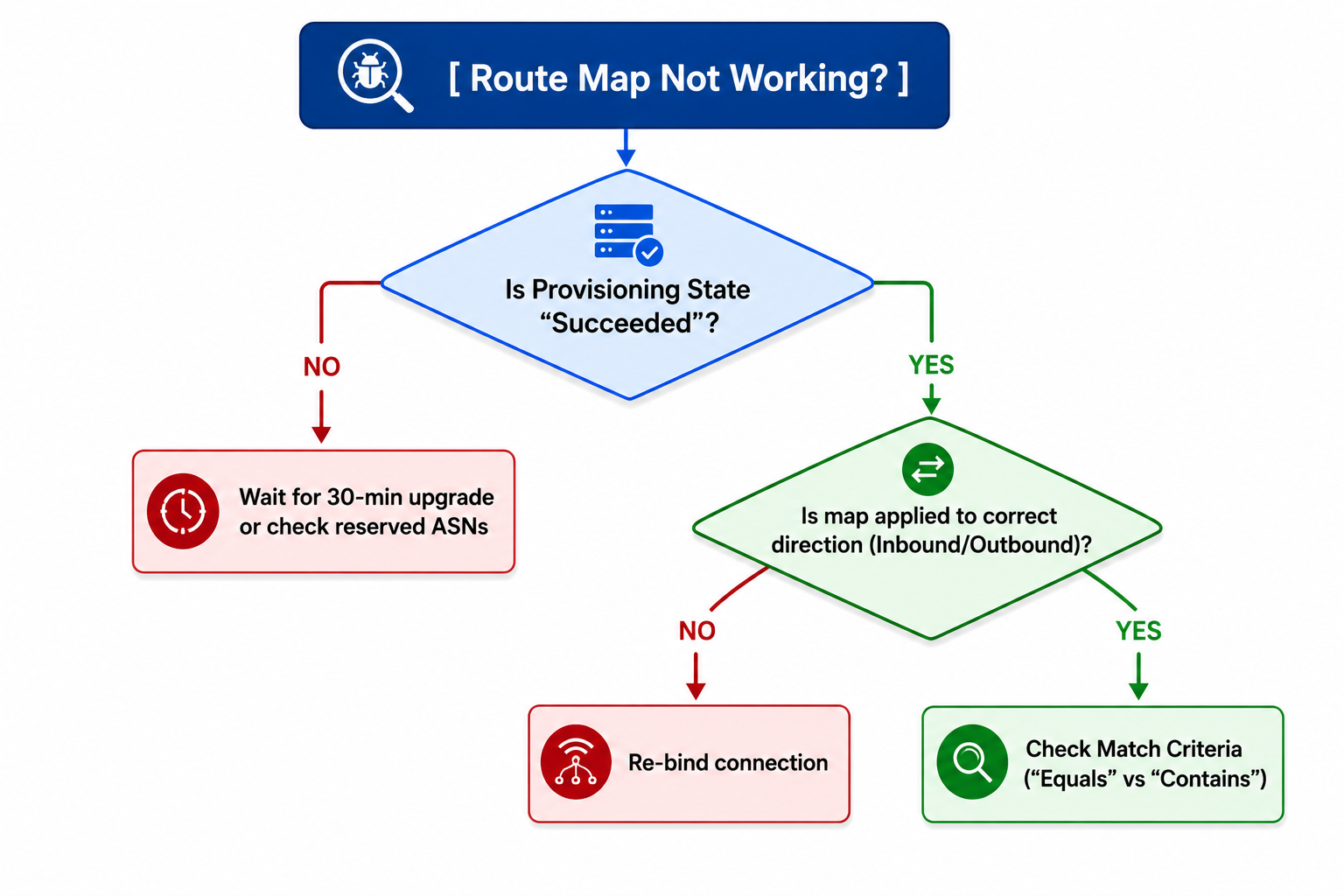
Check Provisioning State: Ensure the Route Map state shows
Succeeded. If stuck inUpdating, the initial 30-minute Route Server control-plane upgrade may still be in progress.Verify Match Condition Granularity:
Equalsrequires an exact prefix length match (10.1.0.0/16will not match10.1.1.0/24).Switch to
Containsif you intend to match child subnets.
Inspect Outbound Egress Traversal: Remember that Outbound Route Maps do not change Azure Route Server's internal path selection. If Route Server selects Path A over Path B internally, applying an outbound map on Path A will alter what downstream peers see, but won't force Route Server to pick Path B.
Audit Rule Ordering: Confirm that a rule set to
Next step = Terminateisn't inadvertently blocking execution of downstream rules intended for other prefixes.
Conclusion & Summary Table
Azure Route Server Route Maps transforms Azure Route Server from a basic dynamic BGP proxy into a feature-rich, enterprise-grade traffic engineering engine. By leveraging route aggregation, filtering, AS-PATH prepending, and community tagging directly at the cloud edge, cloud network engineers can enforce strict routing hygiene and build resilient hybrid architectures.
Feature Area | Without Route Maps | With Azure Route Server Route Maps |
Route Filtering | None (All learned routes accepted) | Granular drop policies by prefix, AS-PATH, or Community |
Path Selection Control | Must configure on-prem routers or NVAs | Outbound AS-PATH prepending directly in Azure |
Route Table Capacity | High risk of hitting 1,000-route limits | Inbound/Outbound prefix aggregation & summarization |
Metadata Tagging | Static / No modification | Dynamic BGP Community addition, replacement, or removal |