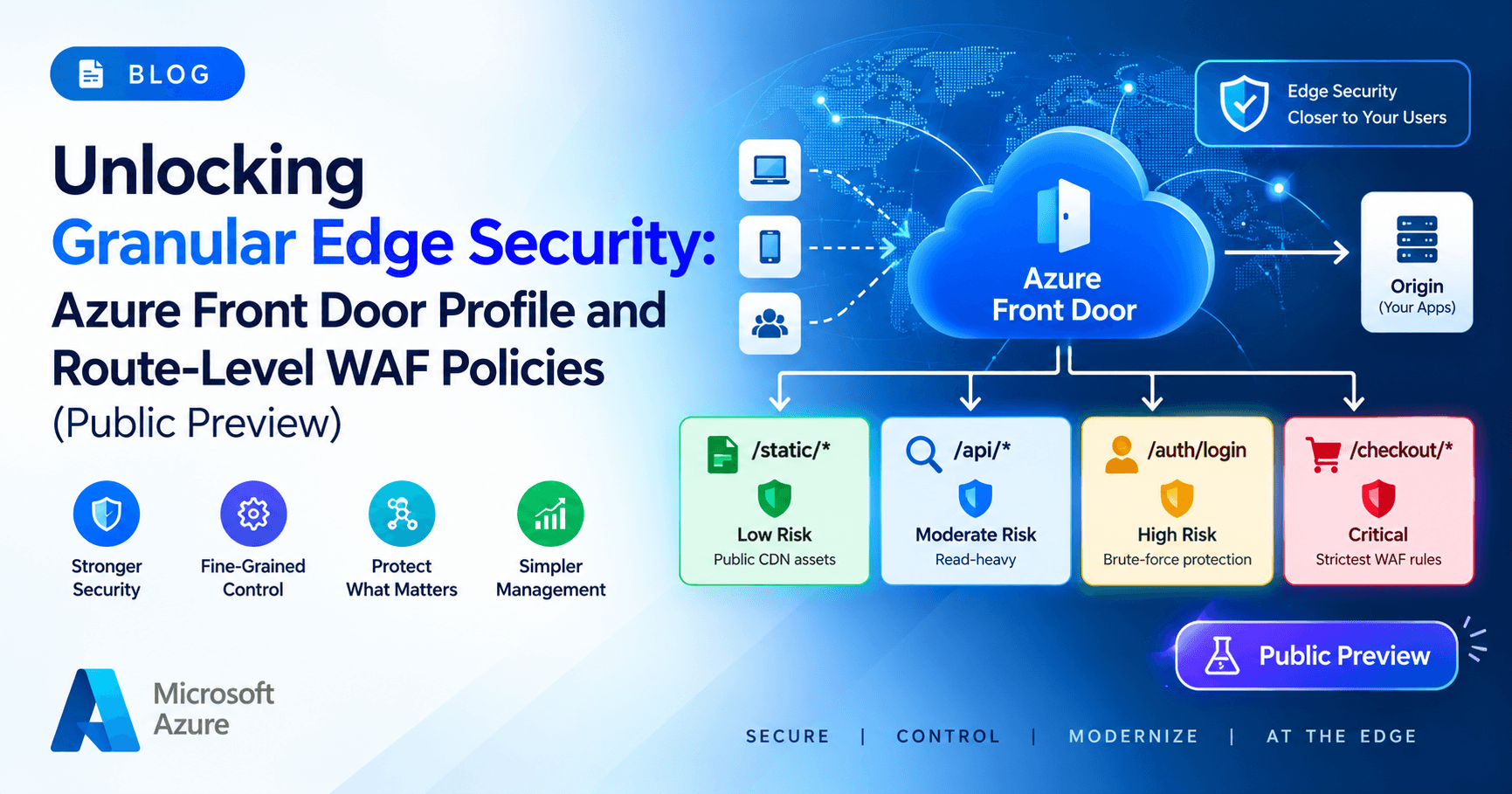
Managing application security across modern distributed architectures has always involved balancing two competing priorities: broad, consistent baseline protection across every endpoint and granular, tailored defenses for high-risk application paths.
Historically, Azure Web Application Firewall (WAF) associations on Azure Front Door operated primarily at the custom domain / frontend level. While effective, this model forced architects to choose between over-permissive global policies or fragmented duplicate policies when specific endpoints (like an authentication API or a checkout funnel) needed stricter rate limits and tighter inspection rules.
With Microsoft's announcement (Azure Update 569804), Profile-level and Route-level WAF policy associations are officially in Public Preview.
This release provides the missing layers in edge governance, introducing a multi-tier attachment architecture that minimizes policy duplication while maximizing defensive depth.
The Core Problem: The Domain-Level Dilemma
In modern microservices and API gateways deployed behind Azure Front Door, a single custom domain (e.g., api.example.com or [www.example.com](https://www.example.com)) often routes traffic to dozens of backends:
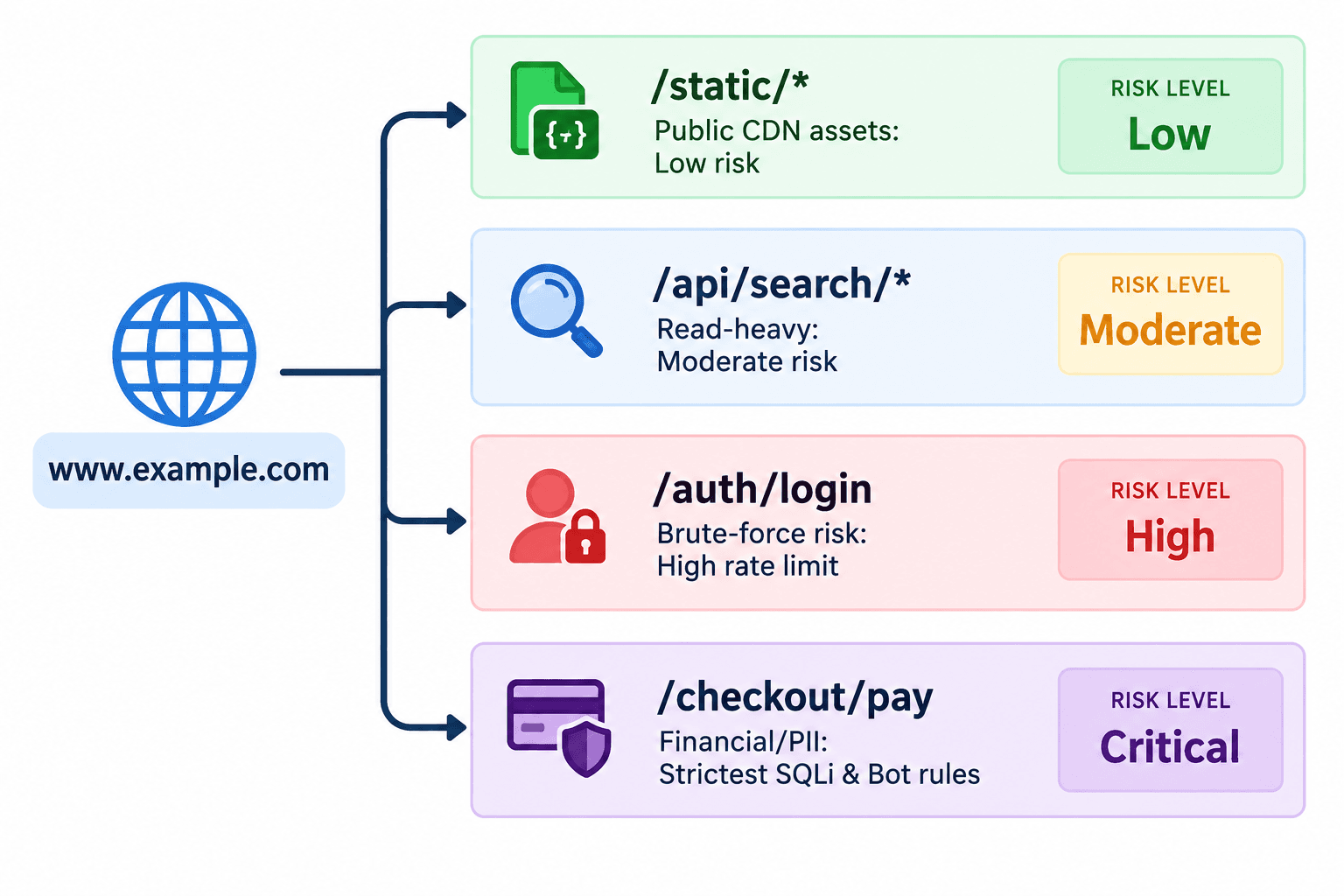
reviously, because WAF policies were tied directly to the frontend host or domain:
Compromised Rule Sets: If
/auth/loginneeded aggressive rate limiting (e.g., max 10 requests/minute per client IP), applying it at the domain level risked throttled legitimate users browsing catalog items elsewhere on the domain.Policy Sprawl: To work around this, teams had to provision separate domains or subdomains solely to apply different WAF rules, complicating DNS architectures, SSL/TLS certificates, and frontend routing tables.
Operational Overhead: Replicating common rules (like the Microsoft Default Rule Set or shared IP blocklists) across multiple custom domain policies created configuration drift and testing overhead.
What’s New: Multi-Tier Policy Attachment Scopes
Azure Front Door WAF now supports three distinct policy scopes, allowing you to build an intentional, layered security posture:
Scope | Association Target | Primary Use Case |
Profile-Level | Entire Front Door Profile | Broad baseline defense (e.g., baseline DRS rules, global Geo-filtering, shared corporate IP allow/block lists). |
Domain-Level | Specific Endpoint / Hostname | Host-specific controls (e.g., tailored bot policies for mobile endpoints vs. web portals). |
Route-Level (New) | Individual Routing Rule | Precision security for sensitive URI paths (e.g., strict rate limits on |
How It Works: The Policy Precedence Hierarchy
A single web request delivered by Azure Front Door is evaluated against exactly one WAF policy at runtime at the Microsoft edge.
When policies are attached at multiple scopes across your environment, Azure Front Door applies a strict most-specific scope wins precedence model:
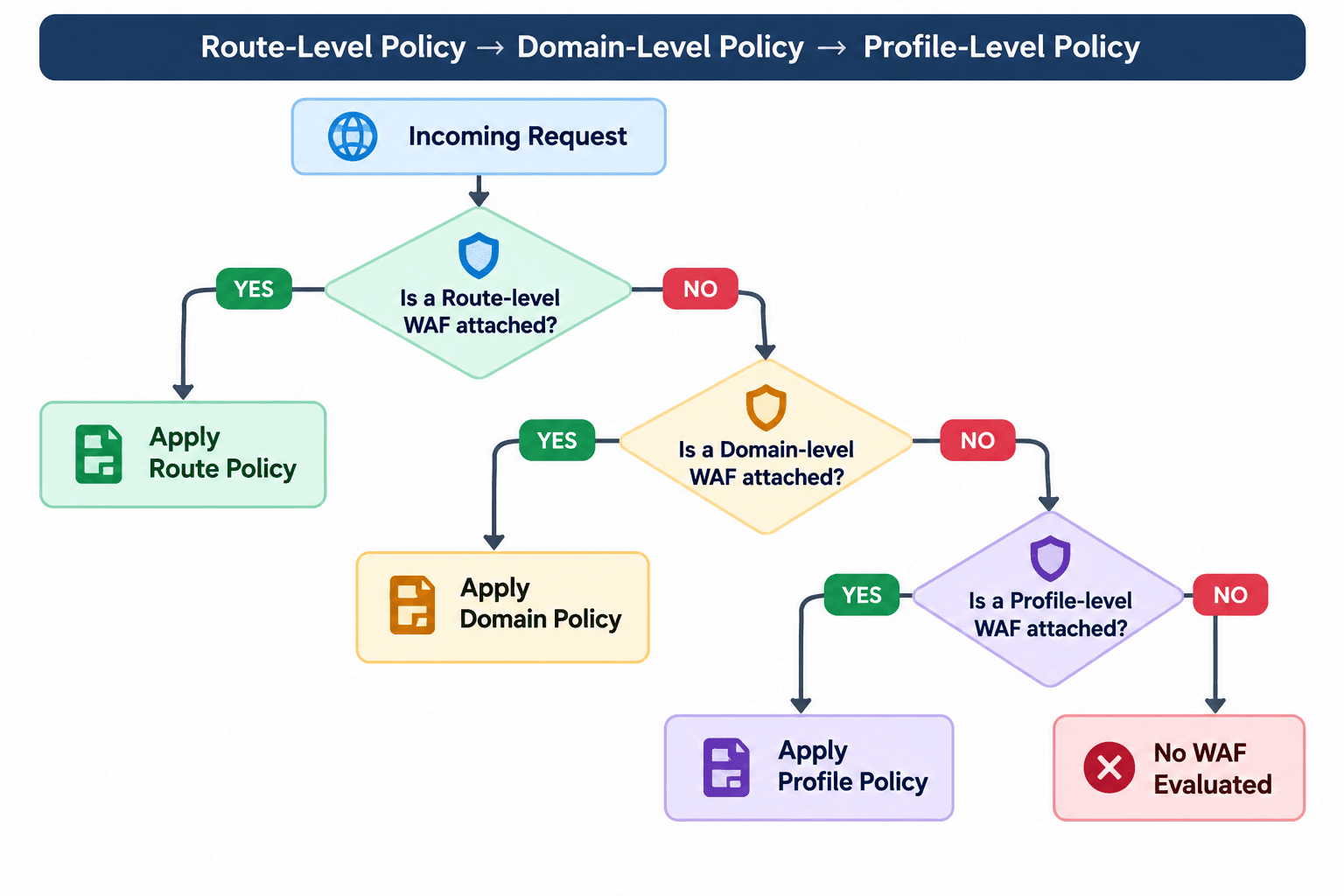
Precedence in Action
Scenario A: A request hits
[https://contoso.com/api/v1/auth](https://contoso.com/api/v1/auth). You have a Profile-level policy and a Route-level policy attached to/api/v1/auth*.Result: The Route-level policy takes precedence and executes.
Scenario B: A request hits
[https://contoso.com/products](https://contoso.com/products). You have a Profile-level policy and a Domain-level policy forcontoso.com, but no Route-level policy.Result: The Domain-level policy executes.
Scenario C: A request hits
[https://partner.contoso.com/status](https://partner.contoso.com/status). You have only a Profile-level policy configured.Result: The Profile-level policy executes as the default baseline.
Real-World Implementation Scenarios
1. Hardening Sensitive Endpoints (Authentication & APIs)
Profile Policy: Apply standard Managed Default Rule Set (DRS 2.1) and Managed Bot Protection across all inbound traffic in detection/prevention mode.
Route Policy (
/api/login,/identity/oauth/*): Apply a custom rate-limiting rule allowing no more than 15 requests per minute per IP, and configure Bot Manager with JavaScript Challenges to mitigate credential stuffing.
2. Handling High-Volume Webhooks or File Uploads
Problem: File upload paths often trigger false positives on request body size or multipart boundary checks, while third-party partner webhooks (e.g., Stripe, GitHub) may send complex payloads with characters resembling SQLi or XSS patterns.
Solution: Instead of disabling DRS rules or bumping inspection limits profile-wide, attach a tailored Route-level policy to
/api/webhooks/*and/api/documents/uploadthat customizes body inspection limits or disables specific rule IDs without lowering defenses across the rest of the application.
3. Progressive Rule Set Migration & Canary Testing
Moving between Default Rule Set versions (e.g., DRS 2.0 to DRS 2.1) or switching from Detection to Prevention mode can be daunting across an entire estate.
With route scoping, security teams can apply a new policy in Prevention mode on low-impact internal or staging routes first, while keeping the rest of the profile safely on the proven baseline.
Best Practices for Enterprise Rollouts
Establish a Resilient Profile Baseline: Start by defining an organization-wide profile policy containing fundamental hygiene rules: IP reputation, geographic access restrictions, and core CRS/DRS protection in Detection mode until logging confirms clean traffic.
Limit Policy Sprawl: Do not create a separate route policy for every route. Rely on the profile and domain inheritance as much as possible, applying route-level overrides strictly where technical requirements (rate limits, payload exceptions, strict anomaly thresholds) diverge from standard traffic.
Leverage Structured Logging: Send Front Door diagnostic logs (
FrontDoorWebApplicationFirewallLog) to an Azure Log Analytics workspace. Note thepolicyandactionfields in the logs to quickly distinguish whether an event was intercepted by a route, domain, or profile policy.Automate via IaC: Use Bicep, Terraform, or ARM templates to link WAF policies during continuous delivery. Group your policy scopes logically to prevent orphaned rules.
Getting Started
To test profile and route-level associations during the public preview:
Navigate to the Azure Portal and open your Azure Front Door and CDN profiles resource.
Under Security, manage your WAF policies or select an existing Front Door WAF policy.
In the policy configuration blade, view Associated Scopes / Associations and choose whether to attach your policy at the Profile, Domain, or Route level.
Deploy the association and monitor edge metrics via Azure Monitor.
For deeper architectural guidance, refer to the Azure Web Application Firewall on Azure Front Door Overview.