The problem: one exact size, one point of failure
A standard VM create is all-or-nothing. You name one exact size, and if the region has no capacity for it, the deployment fails with an allocation error such as AllocationFailed. Nothing about your workload changed; the hardware pool simply ran dry at that moment.
Teams usually respond in one of three ways, and each has a cost:
Workaround | What it looks like | Hidden cost |
|---|---|---|
Retry loops | Pipeline retries the same size with back-off | Slow, and still fails if capacity doesn't return |
Hand-maintained fallback lists | Script tries D4s_v5 → D4as_v5 → D4ds_v5 ... | Goes stale as new generations ship; easy to pick a weaker size by mistake |
Over-provisioning or reserving | Capacity Reservations for every workload | You pay for capacity whether you use it or not |
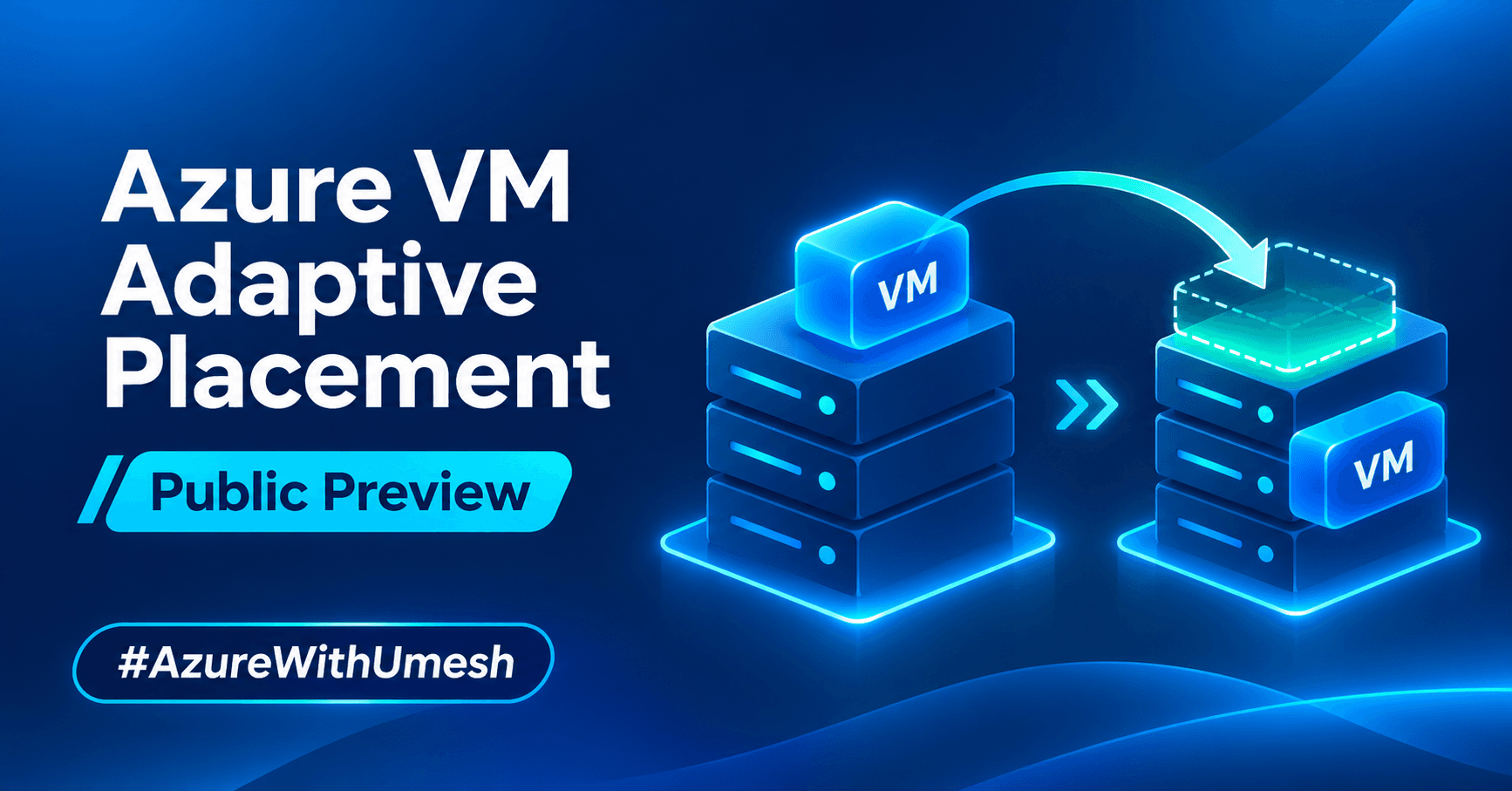
The real insight behind adaptive placement is that most general-purpose workloads don't need one size — they need a 4-vCPU general-purpose VM that performs at least as well as a D4s_v5. Adaptive placement lets you say exactly that.
How Azure VM adaptive placement works
Adaptive placement is not a new VM type or pricing offer — it's a new way to create a VM. You swap one property, and Azure takes over the fallback decision.
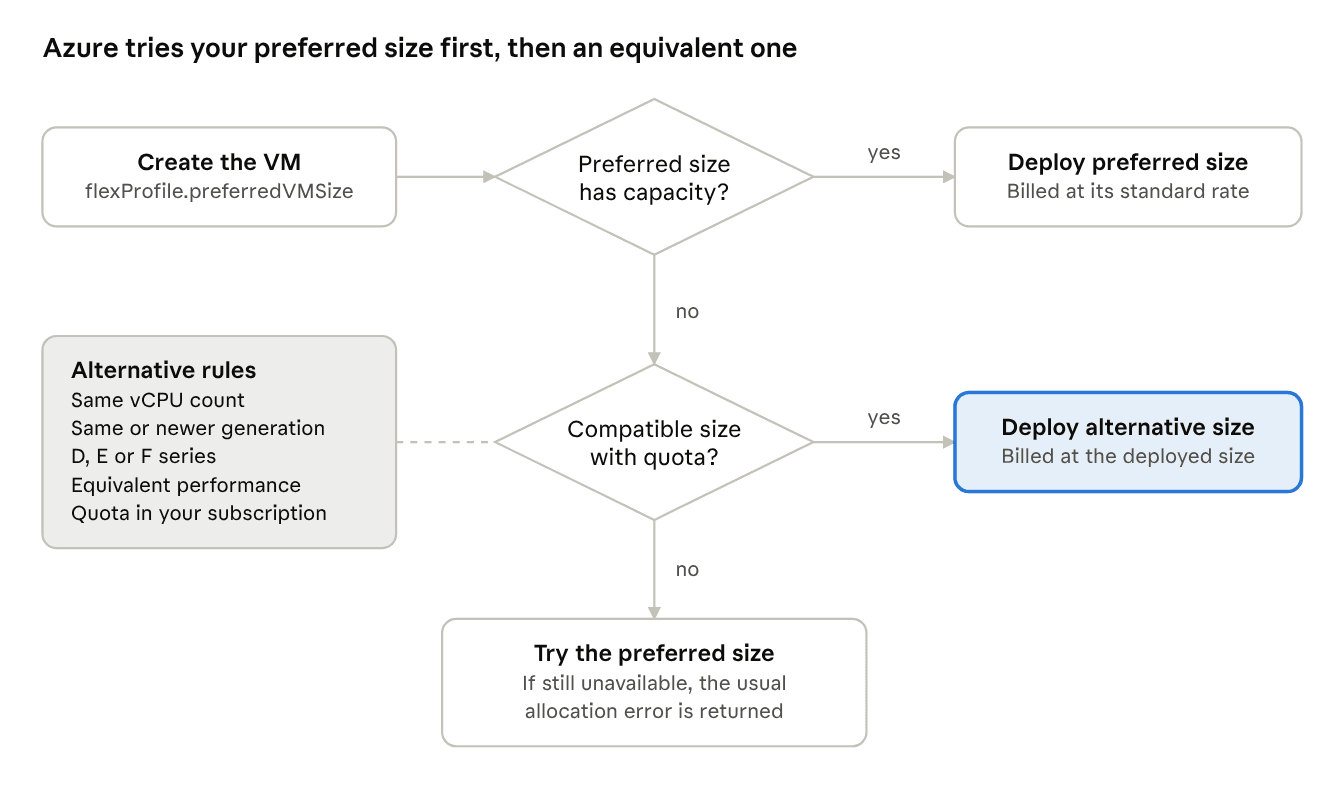
Azure checks your preferred size first. Only if it can't place it does Azure look for an alternative that meets every rule on the left — and if Azure can't evaluate alternatives in time, it simply attempts the preferred size, like a standard create.
Property | Standard create | Adaptive placement |
|---|---|---|
| The exact size you require | Don't send it; a GET returns the size Azure deployed |
| Not used | The size you'd like, e.g. |
Image, OS, disks, network | Set as usual | Set as usual |
API version | Any supported |
|
Supported VM sizes, regions and prerequisites
During the preview, adaptive placement works with three VM families as the preferred size, in 19 regions.
Supported VM families
Family | Workload type | Supported as preferred size |
|---|---|---|
D-series | General purpose | Yes |
E-series | Memory optimized | Yes |
F-series | Compute optimized | Yes |
B, L, M, N, H and others | Burstable, storage, large-memory, GPU, HPC | No |
Preview regions
Geography | Regions |
|---|---|
Americas |
|
Europe |
|
Asia Pacific |
|
Africa |
|
Early-access (EUAP) |
|
High-demand regions such as East US, West Europe and Southeast Asia aren't on the preview list, so plan your test deployments in one of the regions above.
Prerequisites checklist
Subscription registered for the
Microsoft.Compute/FlexProfileEnabledpreview featureTarget region is on the preview list
Microsoft.Compute REST API version
2026-04-01or later (or a tool version that uses it — see the next section)vCPU quota in the target region for the preferred size's family and its sibling families (for example both
Standard_D4s_v5Intel andStandard_D4as_v5AMD)The VM is a standalone VM — not in a Scale Set, Availability Set, Proximity Placement Group, Capacity Reservation group or Dedicated Host
How to create a VM with adaptive placement (step by step)
The whole change is one property: set flexProfile.preferredVMSize and leave out hardwareProfile.vmSize. Everything else — image, OS profile, disks, networking — stays exactly as in a normal VM create. The examples below use canadacentral.
Step 1: Register the preview feature
# Request the preview feature
az feature register --namespace Microsoft.Compute --name FlexProfileEnabled

# Check the state until it shows "Registered"
az feature show --namespace Microsoft.Compute --name FlexProfileEnabled --query properties.state -o tsv

# Propagate the registration to the resource provider
az provider register --namespace Microsoft.Compute
Step 2: Check quota for the preferred size and its siblings
Azure only considers alternative sizes your subscription has quota for. Check both the Intel and AMD families before you deploy:
az vm list-usage --location canadacentral -o table \
  --query "[?contains(name.value, 'DSv5') || contains(name.value, 'DASv5')].{Family:localName, Used:currentValue, Limit:limit}"
If either limit is too low, request an increase in Quotas in the Azure portal before you rely on adaptive placement.
Step 3 (option A): REST API
PUT https://management.azure.com/subscriptions/{subscriptionId}/resourceGroups/{resourceGroupName}/providers/Microsoft.Compute/virtualMachines/{vmName}?api-version=2026-04-01{
"location": "canadacentral",
"properties": {
"flexProfile": {
"preferredVMSize": "Standard_D4s_v5"
},
"storageProfile": {
"imageReference": {
"publisher": "Canonical",
"offer": "ubuntu-24_04-lts",
"sku": "server",
"version": "latest"
},
"osDisk": {
"createOption": "FromImage",
"managedDisk": { "storageAccountType": "Premium_LRS" }
}
},
"osProfile": {
"computerName": "vm-app01",
"adminUsername": "azureuser",
"linuxConfiguration": {
"disablePasswordAuthentication": true,
"ssh": {
"publicKeys": [
{
"path": "/home/azureuser/.ssh/authorized_keys",
"keyData": "<your-public-key>"
}
]
}
}
},
"networkProfile": {
"networkInterfaces": [
{ "id": "/subscriptions/{subscriptionId}/resourceGroups/{resourceGroupName}/providers/Microsoft.Network/networkInterfaces/{nicName}" }
]
}
}
}Note there is no hardwareProfile block. A request that sets both flexProfile and hardwareProfile.vmSize is rejected.
Step 3 (option B): Azure CLI
Azure CLI 2.92.0 or later adds --preferred-size to az vm create and az vm update. Use it instead of --size:
az vm create \
  --resource-group rg-adaptive-demo \
  --name vm-app01 \
  --location canadacentral \
  --image Ubuntu2404 \
  --preferred-size Standard_D4s_v5 \
  --admin-username azureuser \
  --generate-ssh-keys
Step 3 (option C): Azure PowerShell
Use Az.Compute 11.11.0 or later (included in Az 16.5.0). Swap -VMSize for -PreferredVMSize:
$rg       = "rg-adaptive-demo"
$location = "canadacentral"
$nic      = Get-AzNetworkInterface -ResourceGroupName $rg -Name "vm-app01-nic"
$cred     = Get-Credential -UserName "azureuser" -Message "VM admin"

$vmConfig = New-AzVMConfig -VMName "vm-app01" -PreferredVMSize "Standard_D4s_v5"
$vmConfig = Set-AzVMOperatingSystem -VM $vmConfig -Linux -ComputerName "vm-app01" -Credential $cred
$vmConfig = Set-AzVMSourceImage -VM $vmConfig -PublisherName "Canonical" -Offer "ubuntu-24_04-lts" -Skus "server" -Version "latest"
$vmConfig = Add-AzVMNetworkInterface -VM $vmConfig -Id $nic.Id

New-AzVM -ResourceGroupName $rg -Location $location -VM $vmConfig
Step 3 (option D): Bicep / ARM template
Bicep and ARM templates use the same resource schema as REST, so the pattern is the 2026-04-01 API version plus flexProfile. If your Bicep extension hasn't picked up the new type definitions yet, you may see a type warning; the property is still sent to Azure Resource Manager.
resource vm 'Microsoft.Compute/virtualMachines@2026-04-01' = {
  name: 'vm-app01'
  location: 'canadacentral'
  properties: {
    flexProfile: {
      preferredVMSize: 'Standard_D4s_v5'
    }
    // no hardwareProfile.vmSize here
    storageProfile: { /* image + osDisk as usual */ }
    osProfile: { /* computerName, admin, linuxConfiguration */ }
    networkProfile: { /* networkInterfaces */ }
  }
}
SDK users: adaptive placement is available in the Azure SDK for .NET (Azure.ResourceManager.Compute 1.19.0+) and the Azure SDK for Python (azure-mgmt-compute 39.0.0+).
Enable it on an existing VM (and roll back)
Update the VM so it specifies flexProfile.preferredVMSize instead of hardwareProfile.vmSize (with CLI, az vm update --preferred-size). This can change the deployed size, so do it in a maintenance window. To return to a fixed size, send a PUT that omits flexProfile and sets hardwareProfile.vmSize.
Verify which size Azure deployed (and track it across your estate)
After creation, two properties tell the whole story: flexProfile.preferredVMSize is what you asked for, and hardwareProfile.vmSize is what Azure deployed — and what you're billed for.
REST
GET https://management.azure.com/subscriptions/{subscriptionId}/resourceGroups/{resourceGroupName}/providers/Microsoft.Compute/virtualMachines/{vmName}?api-version=2026-04-01Azure CLI (one VM)
az vm show -g rg-adaptive-demo -n vm-app01 \
  --query "{preferred: flexProfile.preferredVMSize, deployed: hardwareProfile.vmSize}" -o table
Azure Resource Graph (every adaptive VM you can see) — my favourite pattern for managed-service estates, because it shows exactly where Azure substituted a size:
resources
| where type =~ 'microsoft.compute/virtualmachines'
| extend preferred = tostring(properties.flexProfile.preferredVMSize),
         deployed  = tostring(properties.hardwareProfile.vmSize)
| where isnotempty(preferred)
| extend substituted = preferred != deployed
| project name, resourceGroup, location, preferred, deployed, substituted
| order by substituted desc, name asc
Run it in Resource Graph Explorer, pin it to a dashboard, or schedule it in a Logic App so finance and operations see substitutions the day they happen.
Adaptive placement vs instance mix vs Capacity Reservations
Pick adaptive placement for standalone VMs that can run on any equivalent size; pick instance mix for Scale Sets; pick Capacity Reservations when you need a guarantee.
Fixed size (standard create) | Adaptive placement (preview) | Instance mix for VMSS | Capacity Reservations | |
|---|---|---|---|---|
Scope | Single VM | Single VM | Virtual Machine Scale Sets | VMs and Scale Sets |
Who chooses the size | You, one exact size | Azure, from compatible D/E/F sizes | You list the sizes; Azure allocates across them | You, one exact size |
Capacity guaranteed? | No | No — better odds only | No — better odds across sizes | Yes |
Extra cost | None | None | None | Paid whether used or not |
Your own fallback list? | You script it | Not supported | Yes | Not applicable |
Best for | Workloads tied to one SKU (licensing, certification) | Dev/test, CI agents, app servers, jump boxes, burst rebuilds | Scaled-out stateless tiers | Business-critical DR and peak events |
These options don't stack in the preview: a VM tied to a Capacity Reservation can't also use adaptive placement.
Field notes: best practices and gotchas
Adaptive placement removes a failure mode, but it also means the size you get is no longer a constant. These are the things I'd check before rolling it out across a customer estate.
Quota is your fallback list now. Azure only picks sizes you have quota for. Request quota for the Intel and AMD versions of your preferred size (for example
Standard_D4s_v5andStandard_D4as_v5), and consider the next generation too. No quota, no alternative.Budget for the price spread. You're billed for the deployed size at standard rates, and equivalent sizes don't always cost the same. Set budget alerts per resource group and review the Resource Graph query above in your monthly cost review.
Re-check how reservations apply. Reservations and other benefits follow the deployed size. A reservation bought for one series may not cover a substituted series, so check its instance size flexibility group. Savings plans for compute are generally the more forgiving fit for flexible sizing.
Stop hard-coding the size downstream. Scripts, monitoring thresholds, CMDB entries and runbooks should read
hardwareProfile.vmSizeat runtime rather than assuming the preferred size.Test size-specific dependencies. Same vCPU count and equivalent performance doesn't mean every attribute is identical. If your workload depends on a local temp disk, a CPU vendor, specific instruction sets or vendor licensing tied to hardware, test it on the likely alternatives first.
Know when the size can change. Stop, deallocate and start keep the deployed size. Updating
preferredVMSizewhile the VM is deallocated can select a new size. Size updates aren't supported while the VM is hibernated.Make IaC the source of truth. The portal can't create adaptive VMs during preview, so keep the definition in Bicep, Terraform (once the provider supports it) or scripts, and tag these VMs (for example
placement=adaptive) so operators recognise them.Treat it as preview. It's covered by the Supplemental Terms of Use for Microsoft Azure Previews. Start with dev/test, CI/CD agents and rebuildable app servers before production.
Availability zones aren't addressed yet. The documentation doesn't say how zonal requests behave, so test zonal deployments in your target region before you depend on them.
Limitations during the public preview
Area | Preview behaviour |
|---|---|
Deployment target | Single VMs only; Virtual Machine Scale Sets aren't supported (use instance mix) |
Size families | Only D, E and F series as the preferred size |
vCPU count | Alternatives always keep the preferred size's vCPU count |
Property combination |
|
Azure portal | Can't create adaptive placement VMs |
Custom fallback list | Not supported; Azure chooses the alternative |
Not supported with | Capacity Reservations, Azure Dedicated Hosts, Availability Sets, Proximity Placement Groups |
Hibernation | No size updates while hibernated |
Capacity | Improves the odds of allocation; not a guarantee |
Frequently asked questions
What is Azure VM adaptive placement?
Azure VM adaptive placement is a preview way to create a virtual machine where you name a preferred size instead of an exact one. If the preferred size has no capacity in the region, Azure deploys a compatible D-, E- or F-series size with the same vCPU count and equivalent performance.
Does adaptive placement fix AllocationFailed errors?
It reduces them. When your preferred size is unavailable, Azure can deploy a compatible alternative instead of failing. If no alternative is available and the preferred size also can't be placed, you still get the usual allocation error. It improves your odds; it doesn't guarantee capacity.
What is flexProfile.preferredVMSize?
It's the new VM property that turns on adaptive placement. You set flexProfile.preferredVMSize (for example Standard_D4s_v5) instead of hardwareProfile.vmSize. After deployment, hardwareProfile.vmSize shows the size Azure actually deployed. The two can't be set in the same request.
Will Azure give me fewer vCPUs or an older VM generation?
No. Alternatives always have the same vCPU count as your preferred size and are the same or a newer version (v5 or later for a v5 preferred size). They also deliver performance equivalent to your preferred size.
Does VM adaptive placement cost extra?
No. There's no charge for the feature itself. You're billed at standard rates for the size Azure deploys, and reservations and other pricing benefits apply based on that deployed size.
Do I need quota for the alternative sizes?
Yes. Azure can only deploy an alternative size your subscription has quota for. For the best results, request quota in the target region for both the Intel and AMD versions of your preferred size, such as Standard_D4s_v5 and Standard_D4as_v5.
Can I use adaptive placement with Virtual Machine Scale Sets?
Not during the preview. Adaptive placement supports single VMs only. For Scale Sets, use instance mix, which lets a scale set allocate across multiple VM sizes you choose.
Can I enable adaptive placement on an existing VM?
Yes. Update the VM to specify flexProfile.preferredVMSize instead of hardwareProfile.vmSize; the deployed size may change. To switch back, send a PUT that omits flexProfile and sets hardwareProfile.vmSize.
Does stopping and starting the VM change its size?
No. Stop, deallocate and start keep the previously deployed size, so billing stays the same. Only updating preferredVMSize while the VM is deallocated can select a different compatible size.
Which regions support VM adaptive placement?
Nineteen regions during preview, including Canada Central, UK South, North Europe, Sweden Central, Germany West Central, Australia East, Japan East, East Asia and Brazil South. See the full region table above.
Can I create an adaptive placement VM in the Azure portal?
Not yet. During the preview, use the REST API (version 2026-04-01 or later), Azure CLI 2.92.0+, Azure PowerShell (Az 16.5.0+), or the .NET and Python SDKs.
Conclusion: let the platform own the fallback
VM adaptive placement turns "I need exactly this SKU" into "I need this much compute" — and that's how most workloads actually behave. For dev/test environments, build agents, jump boxes and rebuildable app servers, it can retire the retry loops and stale fallback lists we've all been maintaining. Get the quota right, watch the deployed size, and keep fixed sizes or Capacity Reservations for the workloads that truly need them.
Try it this week: register FlexProfileEnabled, deploy one test VM in a preview region, and run the Resource Graph query to see what Azure placed. Then tell me in the comments: which workloads would you move first?
Further reading (official):