
If you've ever managed a Web Application Firewall in production, you know the drill: the managed rulesets do a great job stopping SQL injection, XSS, and other common attacks — right up until they block a perfectly legitimate request from your own application. Historically, your options for dealing with false positives in Azure WAF were somewhat blunt: disable a rule entirely, exclude a request element from inspection, or write a custom Allow rule that skips most of the ruleset altogether.
Microsoft has now announced the public preview of Exceptions for Azure WAF on both Azure Application Gateway (v2) and Azure Front Door. Exceptions give you a precise, scoped way to let specific traffic bypass specific WAF rules — without weakening protection for everything else.
What are WAF Exceptions?
Exceptions let you bypass WAF inspection for requests that match conditions you define, scoped to exactly the part of the ruleset that's causing trouble. You can scope an exception to:
A specific rule — for example, just the "Restrict Content-Type Header" rule
A rule group — such as the SQL injection rule group
An entire managed ruleset
This is the sweet spot between exclusions (too narrow for some scenarios) and custom Allow rules (often too broad). More on that comparison below.
Note that Exceptions require the next-generation WAF engine and a modern managed ruleset version: CRS 3.2, DRS 2.1, or later on Application Gateway, and DRS 2.1 or later on Azure Front Door. If you're still running an older ruleset, this is another good reason to upgrade.
How you define an exception
An exception is built from two things: a scope (which rules to bypass) and a set of request attributes that identify the matching traffic. Supported attributes are:
Request URI
Remote IP address
Request header name and value
Each attribute can be matched with one of these operators:
Equals — exact match (e.g., a header named
bearerToken)Starts with
Ends with
Contains
IP Match — one or more IP addresses
A practical example
Say your login and logout pages keep tripping SQL injection rules because of how credentials or tokens are posted. You don't want to disable SQLi protection site-wide — you just want those two endpoints excluded from that rule group. With Exceptions, the setup in the Azure portal looks like this:
- Open the WAF policy and go to Settings > Managed rules.
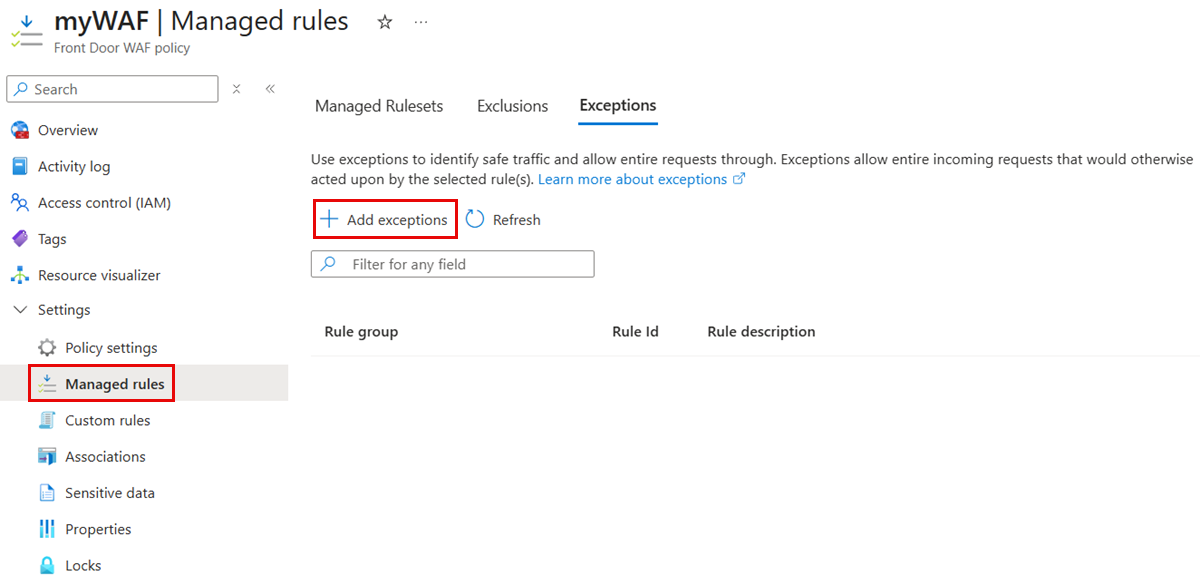
On the Exceptions tab, select Add exceptions.
Under Applies to, choose the ruleset (e.g., Microsoft_DefaultRuleSet_2.1) and pick the scope — entire ruleset, a rule group, or specific rules.
Select Add exception, then configure the match variable (Request URI), the operator (Equals), and the values (
/login.php,/logout.php).Select Add, then Save.
The new exception shows up on the Exceptions tab, and the SQLi rules will no longer evaluate requests to those two paths — while every other rule keeps running against them, and SQLi protection keeps running everywhere else. Application Gateway also supports configuring this via PowerShell and Azure CLI.
Exceptions vs. Exclusions vs. Custom Allow rules
Azure WAF now gives you three distinct tools for allowing traffic, and choosing the right one matters:
Exclusions skip inspection of a specific element within a request — a header, query parameter, or cookie — while the rest of the request is still inspected. Classic use case: a session cookie full of random characters that keeps triggering SQLi false positives. Exclude the cookie value; everything else stays inspected.
Custom rules with an Allow action let the entire request bypass DRS, CRS, and Bot Protection. This bypass is absolute — once the Allow action fires, none of those rulesets evaluate the request (the HTTP DDoS protection ruleset still runs, so you keep coverage against volumetric attacks). Use this only for traffic you fully trust, such as a well-known partner API on a fixed IP range, because it effectively turns off signature and anomaly detection for that traffic.
Exceptions sit in between: they bypass inspection only for the rules, rule groups, or rulesets you specify, while everything else keeps evaluating the request. Uniquely, exceptions can be applied to DRS, CRS, Bot Protection, and even the HTTP DDoS ruleset. If a single rule is blocking valid mobile app requests, you can create an exception for that one rule and leave all other protections intact.
A rough rule of thumb:
You want to... | Use |
|---|---|
Skip inspection of one field in a request | Exclusion |
Skip specific rules for specific traffic | Exception |
Fully trust certain traffic and skip nearly everything | Custom Allow rule |
Microsoft's guidance here is worth repeating: make exceptions as narrow as possible. Every exception is a deliberate hole in your inspection coverage. A broad exception — say, an entire ruleset bypassed for a URI prefix — might unintentionally expose your application to attack. Prefer per-rule exceptions whenever you can, and pair them with tight request-attribute matching.
Wrapping up
Exceptions close a long-standing gap in Azure WAF's false-positive toolkit. Instead of choosing between disabling a rule globally or writing an all-or-nothing Allow rule, you can now say precisely: "for this traffic, skip this rule — and nothing else." That's exactly the kind of granularity WAF operators have been asking for.
If you're on CRS 3.2 / DRS 2.1 or later, the Exceptions tab is waiting for you under Managed rules in your WAF policy. Give it a try, and keep those exceptions tight.
References
Discussion (0)
Sign in to join the discussion. Comments are moderated.